Turnkey Verifiable Cloud is currently in Private Beta. Join the waitlist to request access.
This guide covers how to direct traffic to a specific deployment, delete a deployment or app, and restore a deleted deployment. For creating and approving your first deployment, see the TVC quickstart.

Direct traffic to a deployment

Each TVC app has one live deployment at a time. To switch traffic to a different deployment, use the dashboard or the CLI. Dashboard: Click into your deployment on the TVC dashboard and click Direct Traffic, then confirm with Make live.
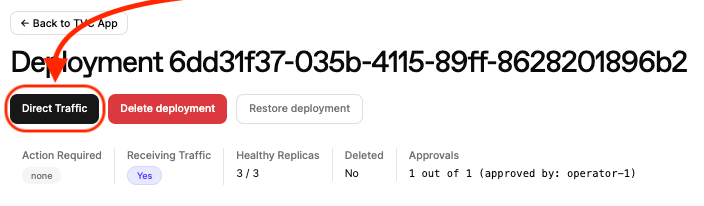
Direct Traffic button on deployment page
CLI:
tvc app set-live-deploy --deploy-id <DEPLOYMENT_UUID>
On success:
Set-live-deploy accepted.

Deployment ID: <DEPLOYMENT_UUID>
Activity ID: <ACTIVITY_UUID>
Activity Status: Active

Delete a deployment

Deleting a deployment tears down its deployed resources so that the enclave instances are stopped and cleaned up. The deployment record remains visible in the dashboard. Dashboard: Click into your app, find the deployment, and click Delete deployment.
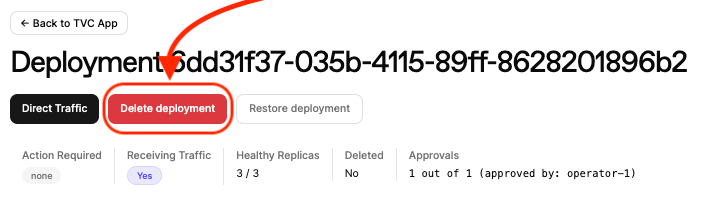
Delete button on deployment page
CLI:
tvc deploy delete --deploy-id <DEPLOYMENT_UUID>
On success:
Deployment delete accepted; deployment is marked for deletion.

Deployment ID: <DEPLOYMENT_UUID>
Activity ID: <ACTIVITY_UUID>
Activity Status: Active

Delete an app

Deleting an app tears down all of its child deployments. As with deployment deletion, the resources are cleaned up but the records remain visible. Dashboard: Click into your app on the TVC dashboard and click Delete app. CLI:
tvc app delete --app-id <APP_UUID>
On success:
App delete accepted.
App and deployments marked for deletion.

App ID: <APP_UUID>
Activity ID: <ACTIVITY_UUID>
Activity Status: Active

Restore a deployment

A deployment marked for deletion can be restored before its resources are fully cleaned up. Dashboard: Click into your app, find the deployment, and click Restore deployment.
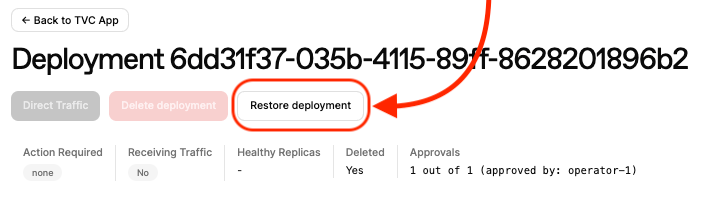
Restore button on deployment page
CLI:
tvc deploy restore --deploy-id <DEPLOYMENT_UUID>
On success:
Deployment restore accepted; deployment is no longer marked for deletion.

Deployment ID: <DEPLOYMENT_UUID>
Activity ID: <ACTIVITY_UUID>
Activity Status: Completed