
What Is an Agentic Wallet?

An agentic wallet is a crypto wallet that an AI agent or automated backend can operate programmatically—signing transactions, interacting with smart contracts, and executing onchain strategies without requiring human approval for every action. This enables a new class of onchain applications:
  • Autonomous trading bots
  • DeFi yield optimizers
  • AI portfolio managers
  • Automated payment processors
  • Multi-agent coordination systems
The core challenge is trust. Giving an agent unrestricted access to a wallet’s private key is dangerous. The solution is delegated access with granular policy controls: the agent gets a credential that can only perform specific actions, and every signing request is evaluated against those rules before the enclave produces a signature.

Why Build on Turnkey

  • Private keys never leave the secure enclave - Unlike solutions that expose raw keys, Turnkey generates and stores keys in hardware-backed secure enclaves. Your agent authenticates via an API key and receives signatures—it never touches the private key itself.
  • Sub-100ms signing latency - Signing speeds 100x faster than MPC-based alternatives, enabling agents to react to market movements and onchain events in real time. Transaction Management automates construction, gas sponsorship, and broadcasting.
  • Granular policy engine - Every signing request is evaluated by Turnkey’s Policy Engine inside the secure enclave before a signature is produced. Scope exactly what the agent can sign by recipient address, contract address, function selector, chain ID, and transaction value limits.
  • Multi-chain support - One integration covers EVM chains, Solana, Bitcoin, Tron, and any blockchain using supported cryptographic curves.
  • Consensus for high-stakes actions - For sensitive operations, require both the agent and a human (or another agent) to approve a transaction before it executes. Provides defense-in-depth even if the agent behaves unexpectedly.
  • Framework agnostic - Low-level cryptographic primitives without imposing opinions on your agent architecture. Integrates naturally with LangChain, CrewAI, Vercel AI SDK, and agentic protocols like x402 and OpenClawd.

Architecture

The diagram below shows how an AI agent gets scoped access through Delegated Access:
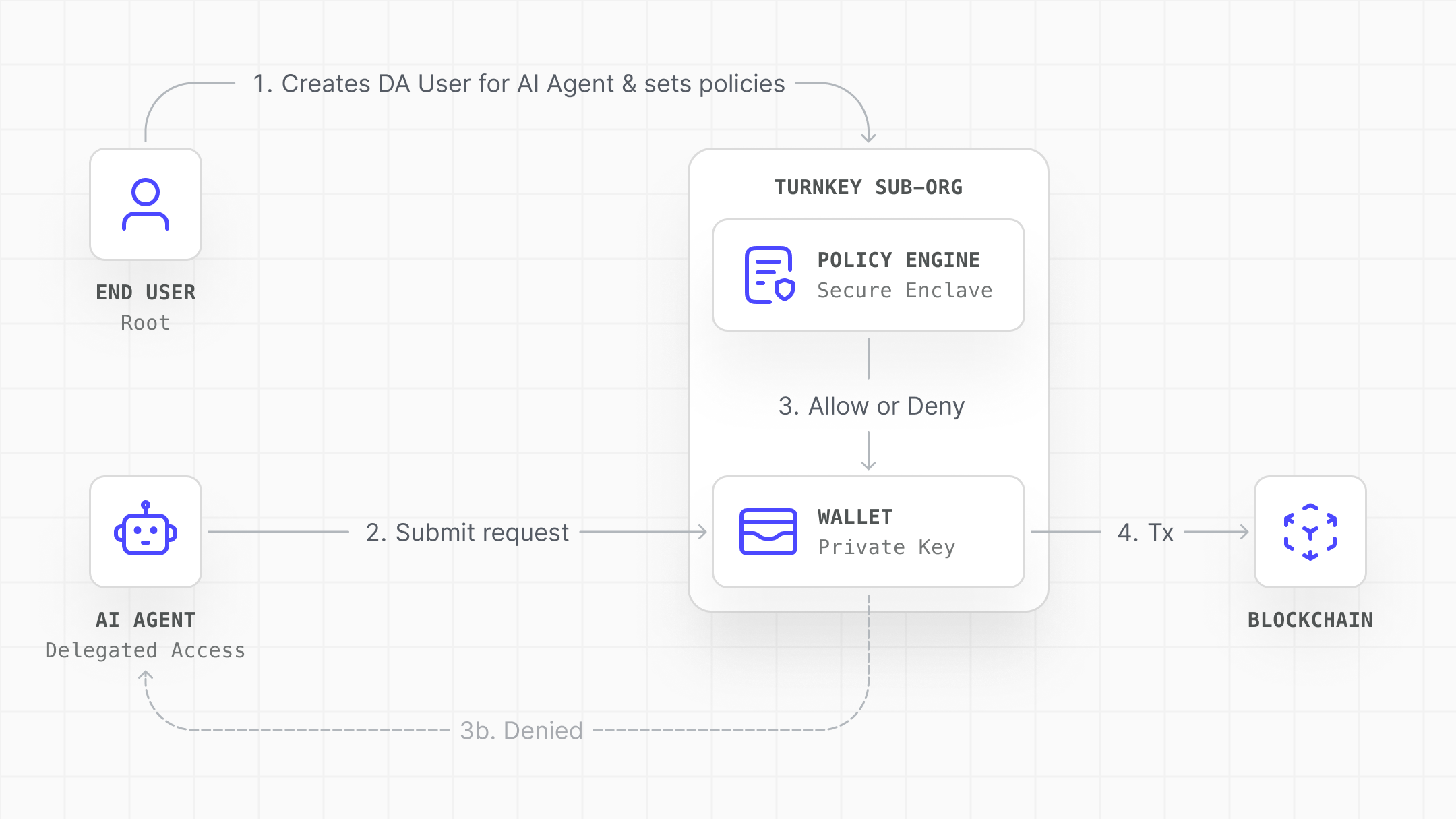
Agentic Wallet
  1. Setup: The end user (root) creates a Delegated Access user and policies
  2. Request: The AI agent sends signing requests using its P-256 API key
  3. Evaluation: The Policy Engine evaluates the request inside the secure enclave
  4. Execution: If approved, the wallet signs and the transaction is broadcast. If denied, it’s rejected before a signature is produced.

Three Critical Properties

  • Separation of control: The end user owns the wallet and sets the rules. The agent operates within those rules.
  • Zero key exposure: The agent never touches the private key. It receives signatures, not keys.
  • Cryptographic enforcement: Policies are evaluated in the secure enclave—no way to bypass them from application code.

Quick Start

1. Create the Wallet

Each agentic wallet lives in a Turnkey sub-organization:
const suborgParams = {
  userName: "User",
  customWallet: {
    walletName: "Agent-Enabled Wallet",
    walletAccounts: [{
      curve: "CURVE_SECP256K1",
      pathFormat: "PATH_FORMAT_BIP32",
      path: "m/44'/60'/0'/0/0",
      addressFormat: "ADDRESS_FORMAT_ETHEREUM",
    }],
  },
};

2. Add the Agent as a Delegated Access User

Create a P-256 API key user for your agent:
import { fetchOrCreateP256ApiKeyUser } from "@turnkey/react-wallet-kit";

const daUser = await fetchOrCreateP256ApiKeyUser({
  publicKey: agentPublicKey,
  createParams: {
    userName: "Trading Agent",
    apiKeyName: "Agent API Key",
  },
});
Key point: The DA user has zero permissions by default. You must explicitly define what it can do.

3. Define Policies

Scope the agent’s authority with policies:
const policies = [{
  policyName: "Allow agent to send to treasury",
  effect: "EFFECT_ALLOW",
  consensus: `approvers.any(user, user.id == '${daUser.userId}')`,
  condition: `eth.tx.to == '${TREASURY_ADDRESS}'`,
}];

await fetchOrCreatePolicies({ policies });
For more complex scoping:
{
  "effect": "EFFECT_ALLOW",
  "consensus": "approvers.any(user, user.id == '<AGENT_ID>')",
  "condition": "eth.tx.to == '<UNISWAP_ROUTER>' && eth.tx.data[0..10] == '0x38ed1739' && eth.tx.chain_id == 1"
}

4. Sign Transactions

Initialize the agent’s Turnkey client and sign:
import { Turnkey } from "@turnkey/sdk-server";
import { TurnkeySigner } from "@turnkey/ethers";

const turnkey = new Turnkey({
  apiBaseUrl: "https://api.turnkey.com",
  apiPrivateKey: process.env.AGENT_PRIVATE_KEY!,
  apiPublicKey: process.env.AGENT_PUBLIC_KEY!,
  defaultOrganizationId: subOrgId,
});

const signer = new TurnkeySigner({
  client: turnkey.apiClient(),
  organizationId: subOrgId,
  signWith: walletAddress,
});

const tx = await signer.connect(provider).sendTransaction({
  to: TREASURY_ADDRESS,
  value: ethers.parseEther("0.1"),
});

Common Patterns

Autonomous Trading Agent

An AI agent that analyzes market data and executes trades on a DEX. The agent has a dedicated wallet with policies scoped to the DEX router contract and specific token pairs. For higher-value trades, a consensus policy requires both the agent and a risk-assessment service (another Turnkey user) to approve the transaction.

DeFi Yield Optimizer

An agent that moves user funds between yield protocols. Policies restrict the agent to a whitelist of approved protocol contracts and deposit/withdraw functions only. Use Turnkey’s smart contract interface upload feature to write policies against decoded ABI parameters.

Automated Payment Processor

A backend that sweeps user deposits to an omnibus wallet and processes payouts. The agent operates on an organization-level wallet with policies that restrict signing to specific payout addresses and require multi-party consensus for large transfers.

Multi-Agent Coordination

Multiple specialized agents share access to a wallet, each with different policy scopes. A research agent can read data and propose transactions; a trading agent can sign to approved contracts; a risk agent must co-approve high-value actions. Turnkey’s consensus mechanism makes this natural: each agent is a separate user with its own API key and policy set.

Security Best Practices

Principle of Least Privilege: This is the single most important security practice for agentic wallets. An agent should only be able to do the minimum set of actions required for its task. If your agent sweeps funds to a treasury, it doesn’t need permission to call arbitrary contracts. If it trades on Uniswap, restrict it to that router’s address and the specific function selectors it uses. Prefer Client-Side DA Setup: When the end-user sets up delegated access from the frontend using their authenticated session, the DA user is created as non-root from the start. There is never a window where the agent has elevated privileges. The server-side approach requires temporarily adding the DA user to the root quorum, which introduces risk if the subsequent quorum update fails. Use DENY Policies as Circuit Breakers: DENY always overrides ALLOW in Turnkey’s policy engine. Use DENY policies as circuit-breakers: for example, a DENY policy that blocks all signing for a specific wallet can be toggled on programmatically if anomalous behavior is detected, and it will override any ALLOW policies in place. Include Self-Delete Permission: Give the DA user permission to delete itself for fast remediation if compromised:
{
  "policyName": "Allow agent to self-delete",
  "effect": "EFFECT_ALLOW",
  "consensus": "approvers.any(user, user.id == '<AGENT_ID>')",
  "condition": "activity.type == 'ACTIVITY_TYPE_DELETE_USERS' && activity.params.user_ids.count() == 1 && '<AGENT_ID>' in activity.params.user_ids"
}

Rotate API Keys Regularly

Use short-lived keys where viable, store in HSMs or secret managers, and monitor usage for anomalies.

Require Consensus for High-Value Actions

For sensitive operations, require multiple approvers:
{
  "consensus": "approvers.any(user, user.id == '<AGENT_ID>') && approvers.any(user, user.id == '<HUMAN_ID>')",
  "condition": "activity.action == 'SIGN'",
  "effect": "EFFECT_ALLOW"
}

Next Steps