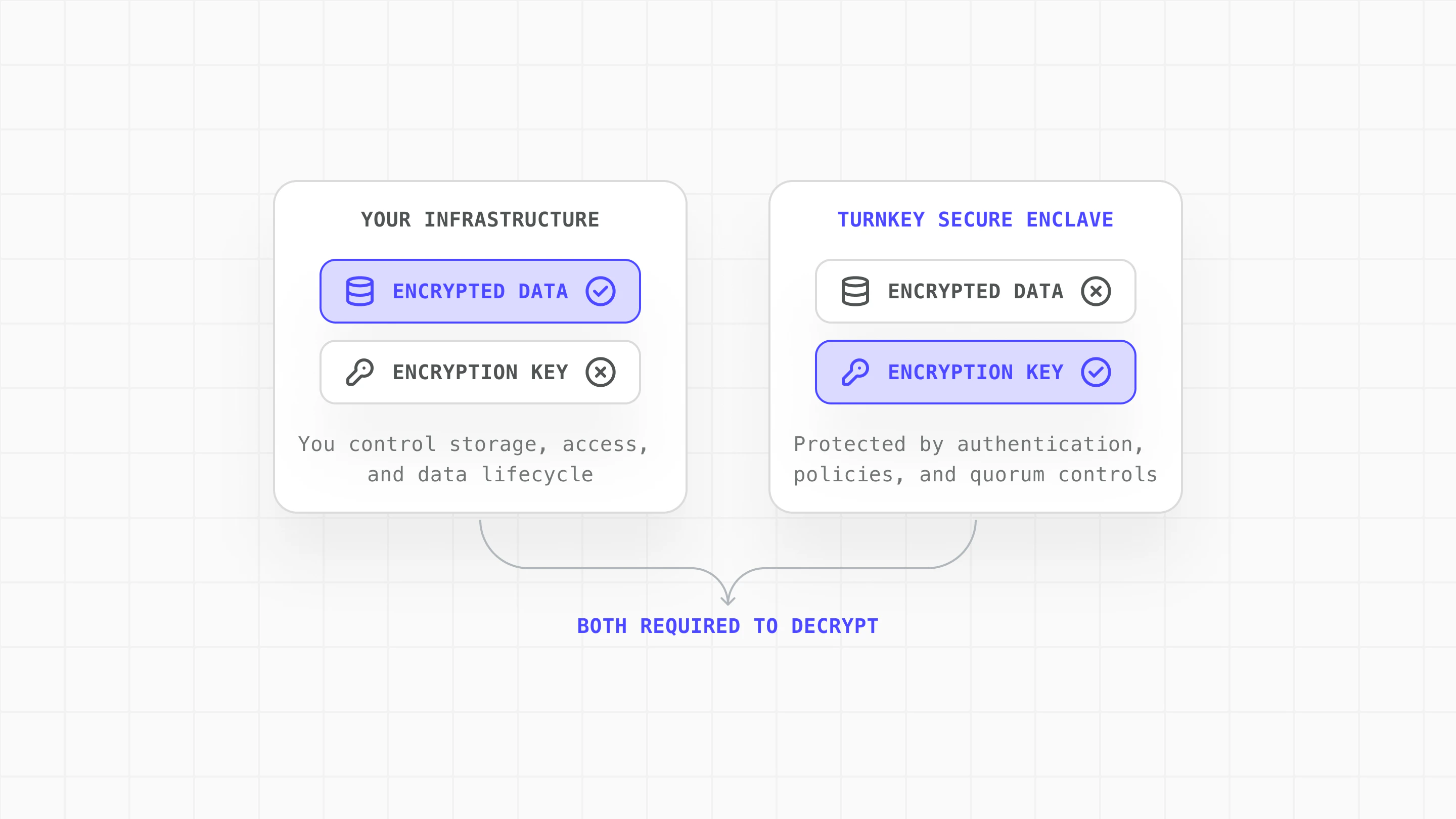
This guide demonstrates how to use Turnkey to store and retrieve encryption keys with granular access controls. Storing the encryption key in Turnkey’s secure enclave, separate from the data in your platform, allows you to build applications with enhanced security, performance, and flexibility.

Why Turnkey for Encryption Key Storage?

Turnkey provides secure storage and policy-controlled access for encryption keys. Use it to encrypt sensitive data, build user-controlled recovery flows, or separate risk between your infrastructure and Turnkey’s secure enclave.

Core Principles

  • Risk separation: Neither party alone can access plaintext data. Your infrastructure holds encrypted data while Turnkey’s secure enclave holds the encryption key.
  • Secure enclaves: Keys are generated and stored inside hardware-backed enclaves. Key material never exists in plaintext outside the enclave boundary.
  • Policy-gated key export: Use Turnkey’s policy engine to add controls over key export, such as requiring quorum approval for sensitive operations.
  • Flexible authentication: Turnkey supports multiple authentication methods for key export: API keys, passkeys, social logins, email and SMS OTP, allowing you to match your security requirements.

Architecture

2-of-2 security model diagram showing encrypted data in your infrastructure and encryption key in Turnkey secure enclave

How to Get Started on Encryption Key Storage with Turnkey

  1. Create encryption keypair: Generate a P-256 keypair in Turnkey. The private key is stored in the secure enclave and never exposed.
  2. Retrieve public key: Fetch the public key to use for encryption on your side.
  3. Encrypt data locally: Use the public key to encrypt sensitive data and store it in your infrastructure.
  4. Authenticate and export decryption key: Authenticate the user and request the private key from Turnkey.
  5. Decrypt and use locally: Decrypt your stored bundles and use them locally, then clear sensitive data from memory.

Use Cases

NeedConfiguration
Users need to recover wallets without managing backup keys themselves.User-controlled backup & recovery: Encrypt recovery bundles on-device using Turnkey’s public key, store encrypted bundles client-side, and gate decryption through user authentication (social logins, passkeys, email OTP).
Compliance or architecture requires sensitive material is not held by any single party.Distributed trust: Store encrypted credentials, API keys, or secrets in your infrastructure. Gate decryption through Turnkey’s policy engine and require quorum approval for key export in high-security scenarios.
1

Create encryption keypair

Generate a P-256 keypair in Turnkey using createPrivateKeys. The private key is stored in Turnkey’s secure enclave and never exposed.
const { privateKeys } = await turnkey.apiClient().createPrivateKeys({
  privateKeys: [{
    privateKeyName: "escrow-encryption-key",
    curve: "CURVE_P256",
    addressFormats: [],
  }],
});
2

Retrieve public key

Fetch the public key to use for encryption:
const { privateKey } = await turnkey.apiClient().getPrivateKey({
  privateKeyId: encryptionKeyId,
});
const publicKey = privateKey.publicKey;
3

Encrypt data locally

Use the public key to encrypt sensitive data on your side. Turnkey never sees the plaintext or the encrypted result:
// Using P-256 ECIES encryption
const encryptedBundle = await encryptWithPublicKey(publicKey, sensitiveData);

// Store in YOUR infrastructure
await saveToYourStorage(encryptedBundle);
Encrypted bundles can be stored anywhere you control:
Storage TypeUse Case
localStorage / IndexedDBClient-side web apps (cleared on browser data wipe)
Secure Enclave (mobile)iOS/Android apps with hardware-backed protection
Your databaseServer-managed data with your standard backup/DR
Object storage (S3, GCS)Scalable, distributed access with appropriate IAM policies
4

Authenticate and export decryption key

Authenticate the user through your normal auth flow, then request the encryption private key from Turnkey using exportPrivateKey:
const targetKeyPair = generateP256KeyPair();

const { exportBundle } = await turnkey.apiClient().exportPrivateKey({
  privateKeyId: encryptionKeyId,
  targetPublicKey: targetKeyPair.publicKeyUncompressed,
});

const decryptionKey = await decryptExportBundle({
  exportBundle,
  embeddedKey: targetKeyPair.privateKey,
  organizationId,
});
Use Turnkey’s policy engine to add controls on key export:
{
  "policyName": "Escrow-Key-Export-Policy",
  "effect": "EFFECT_ALLOW",
  "condition": "activity.type == 'ACTIVITY_TYPE_EXPORT_PRIVATE_KEY' && private_key.id == '<ENCRYPTION_KEY_ID>'",
  "consensus": "approvers.count() >= 2"
}
This example requires two approvers for any export of the encryption key, adding human oversight to sensitive operations.
5

Decrypt and use locally

Decrypt your stored bundles and use them locally, with no further Turnkey calls:
const plaintext = await decryptWithPrivateKey(decryptionKey, encryptedBundle);
// Use the decrypted data (sign transactions, access credentials, etc.)
When done, clear the decryption key and any decrypted data from memory:
secureWipe(decryptionKey);
secureWipe(decryptedData);

The Result: Security Without Compromise

Encryption Key Storage with Turnkey enables you to:
  • Maintain full control over your data and operations
  • Implement flexible recovery flows that keep users in control
  • Distribute trust between your infrastructure and Turnkey
Turnkey provides secure key storage, authentication, and policy enforcement. You decide how to use the keys and where to store the encrypted data.

World App Case Study

World App (by Tools for Humanity) uses Encryption Key Storage with Turnkey for user wallet recovery. Learn more: World App Backup Service (GitHub) World App encrypts each user’s recovery bundle locally on-device. Turnkey’s infrastructure manages the bundle’s encryption key within secure enclaves, which can only be used in response to user-authenticated actions such as OAuth.
  • Users retain control of their encrypted recovery data
  • The encryption key lives in secure enclaves, not centralized servers
  • Key access requires explicit user authentication
  • No single point of failure: both components must be compromised

Resources

Explore the complete implementation in our GitHub encryption-key-escrow example.