Why Turnkey for Embedded Business Wallets?
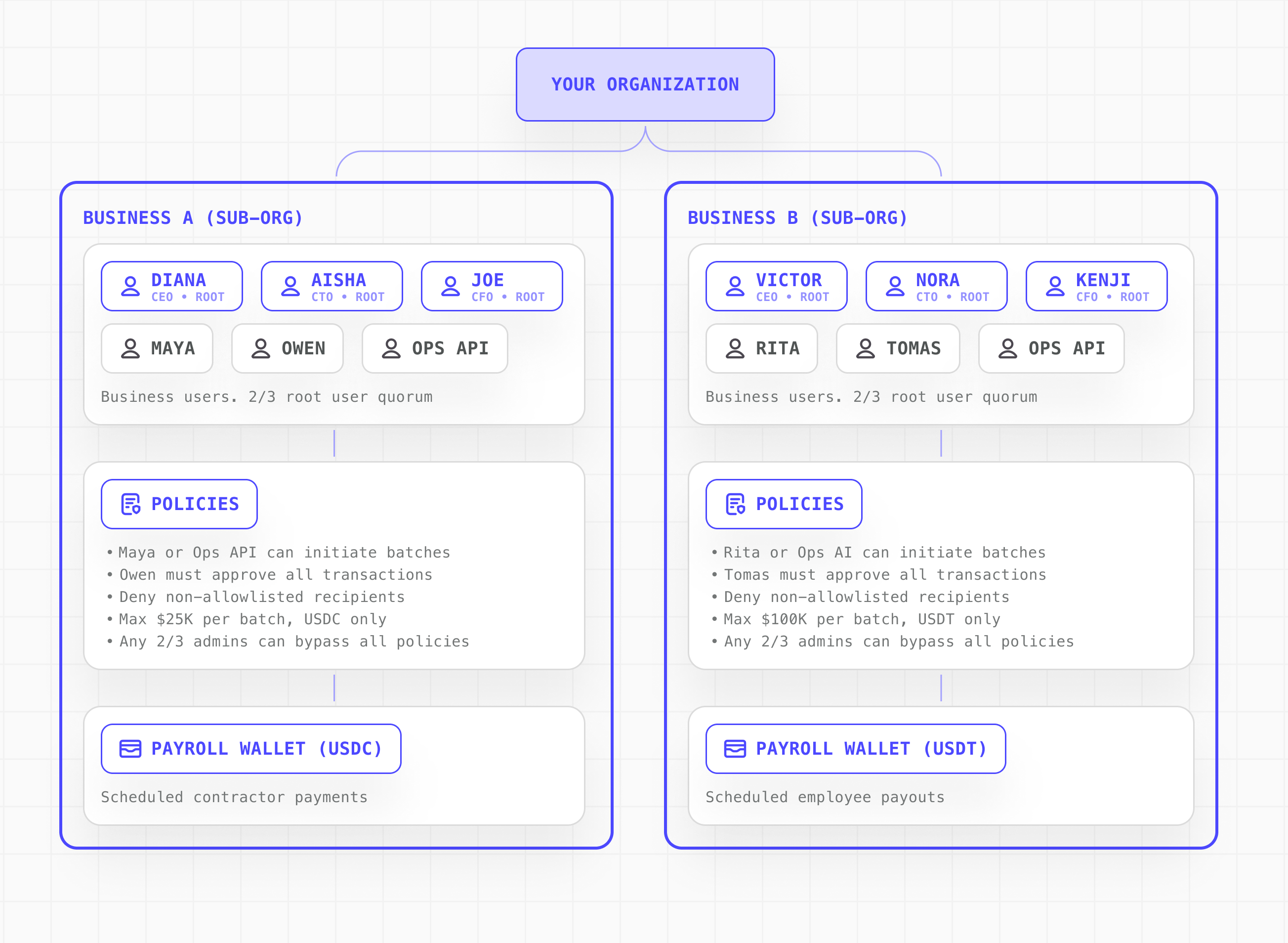
Turnkey’s Embedded Wallet Kit powers some of the largest consumer applications in crypto, creating user accounts and accompanying wallets using familiar authentication like passkeys, email, and social login. Embedded Business Wallets bring that same infrastructure to business operations. Assign roles to users within your customers’ organizations such asfinance-team, operator, or accounts-payable. Then, write policies that reference those roles to control who can sign, what they can sign, and under what conditions. For example, require two finance approvers for large transfers or restrict a backend service to paying only pre-approved vendors.
Core Principles
Instant wallet provisioning Create secure wallets for businesses with familiar authentication methods, plug & play UI components, and options for white-labeling using Embedded Wallet Kit. Scoped org hierarchy Parent organizations can create fully isolated sub-organizations for each business customer — each with their own wallets, users, and policies, all managed from a single integration. Role-based access controls (RBAC) Restrict actions based on a user’s assigned role rather than their individual identity. Roles are represented by tags assigned to users and services. Policies reference these tags to determine wallet access, transaction signing permissions, and approval conditions for each role. Transaction management & gas sponsorship Sponsor gas fees and manage the transaction lifecycle end-to-end from construction to broadcast. See Transaction Management.Architecture

How to Get Started on Embedded Business Wallets with Turnkey
- Set up Turnkey and end-user authentication: Create a Turnkey org and configure how users will authenticate (e.g., email OTP, passkeys, OAuth).
- Integrate Turnkey into the application and initialize the client: Add Turnkey to the app so authentication, sessions, and wallet operations are available at runtime.
- Provision a sub-organization per business or account: Create a sub-org that represents the business entity and will contain its wallets, users, and policies.
- Expose roles and permissions in the application UI: Build UI that allows business users to manage roles (admin, operator, viewer) which map to Turnkey users and policies within the sub-org.
- Enable business-grade wallet actions: Surface wallet functionality (send/receive, signing, recovery) with policy-backed controls that reflect the business’s internal approval structure.
Example Policies Your Customers Can Configure
| Need | RBAC Configuration |
|---|---|
| Treasury Manager initiates high-value transactions, requiring sign-off from both the CFO and Controller before processing. | Multi-approval workflow: Require 2+ approvers for high-value transactions |
| The Controller or Head of Finance needs to maintain approved vendors and spending limits without manual review. | Contractor and vendor payments: Payments to allowlisted addresses with set spending limits. Manage the allowlist to add or remove recipients. |
| Finance or Treasury needs to automatically execute recurring payments with set schedules, recipients, and amounts. | Scheduled payments: Restrict backend services to send recurring disbursements to approved recipients. |
| Any changes to policies or admin permissions should require more than one executive approval. | Organization admin / Root Quorum: Require 2+ executives to approve changes to policies, permissions, or user access. |
Set up Turnkey and configure end-user authentication
Create a Turnkey organization and choose which authentication methods to offer your business users. Turnkey supports passkeys, email OTP, phone OTP, and social logins out of the box. Enable your preferred methods in the dashboard or via API. This determines how business users will log in, create sessions, and authorize wallet operations within their sub-organizations.
Integrate Turnkey into your application using our SDK
Add Turnkey to your application to enable authentication, sessions, and wallet operations for your business users. Our React Wallet Kit provides a drop-in provider component that handles client initialization, session management, and wallet UI.For server-side operations like provisioning sub-organizations or creating policies, use the @turnkey/sdk-server package.
Provision a sub-organization per business or account
Create a sub-organization for each of your business customers. Each sub-organization is an isolated environment containing its own wallets, users, and policies. One business cannot access the resources of another. When creating a sub-organization, you can provision an initial root user and wallet in a single API call. Root users can execute any action or bypass policies if a defined quorum is met. Non-root users can be added after and are recommended for day-to-day operations. They are governed by the policies defined in the sub-organization.Your application logic manages resources in each sub-org such as users, tags, and policies on behalf of your business customers. See Sub-Organizations for more detail.
Expose roles and permissions in the application UI
Build UI that allows the root user(s) to add team members and assign roles (admin, operator, viewer) represented by Turnkey users and policies in the sub-organization. When a root user adds a team member or updates a policy, your backend executes the corresponding action in their sub-organization.
Business users assign roles through your UI, and your application creates the corresponding tags and policies in their sub-org. Once roles are in place, create policies that reference them. See Policy Quickstart for guidance.

Enable business-grade wallet actions
Surface wallet functions like sending payments, signing transactions, and recovery. Combine these with policy-backed controls that reflect the business’s internal approval structure. If a transaction doesn’t match an allowed policy, it’s rejected.Top-level policy: Enforce a maximum transaction size of $100,000 USDC across all business wallets.User-configured policy: When your customers add approved vendors, they dynamically create a policy in their sub-organization.Our policy engine covers a wide range of uses. See Policy Language to start creating policies for your business users.