

 Home
HomePowered by Turnkey
- Helius — Solana’s leading RPC and API platform. Helius offers Wallet-as-a-Service to its developers using Turnkey’s key management infrastructure alongside its RPC, data streaming, and transaction landing services.
- DIMO — decentralized transportation network with 165,000+ connected vehicles. 90% reduction in onboarding time, 30% increase in completion rates. Built their own transactions SDK on Turnkey’s infrastructure.
Why Wallet-as-a-Service?
With consumer wallets and business wallets, your application integrates Turnkey directly and manages wallets for end users. With Wallet-as-a-Service, you build wallet infrastructure on top of Turnkey, and your customers integrate with your SDK rather than Turnkey directly. Your platform provides the auth, signing, and transaction flows your developers build on. Turnkey processes and secures every signing request, but your customers never interact with Turnkey directly. This gives you control over:- The developer experience. Your APIs, your SDK, your branding.
- Transaction approval. Put your backend in the approval path when your business model calls for it.
- Billing and metering. Adapt usage to your business model.
- Compliance. Run your own checks before any transaction executes.
When to use Wallet-as-a-Service
Architecture
Each end user maps to a Turnkey sub-organization. The sub-org contains the user’s wallets, credentials, policies, and activity logs, fully isolated from other users and from your platform’s management layer.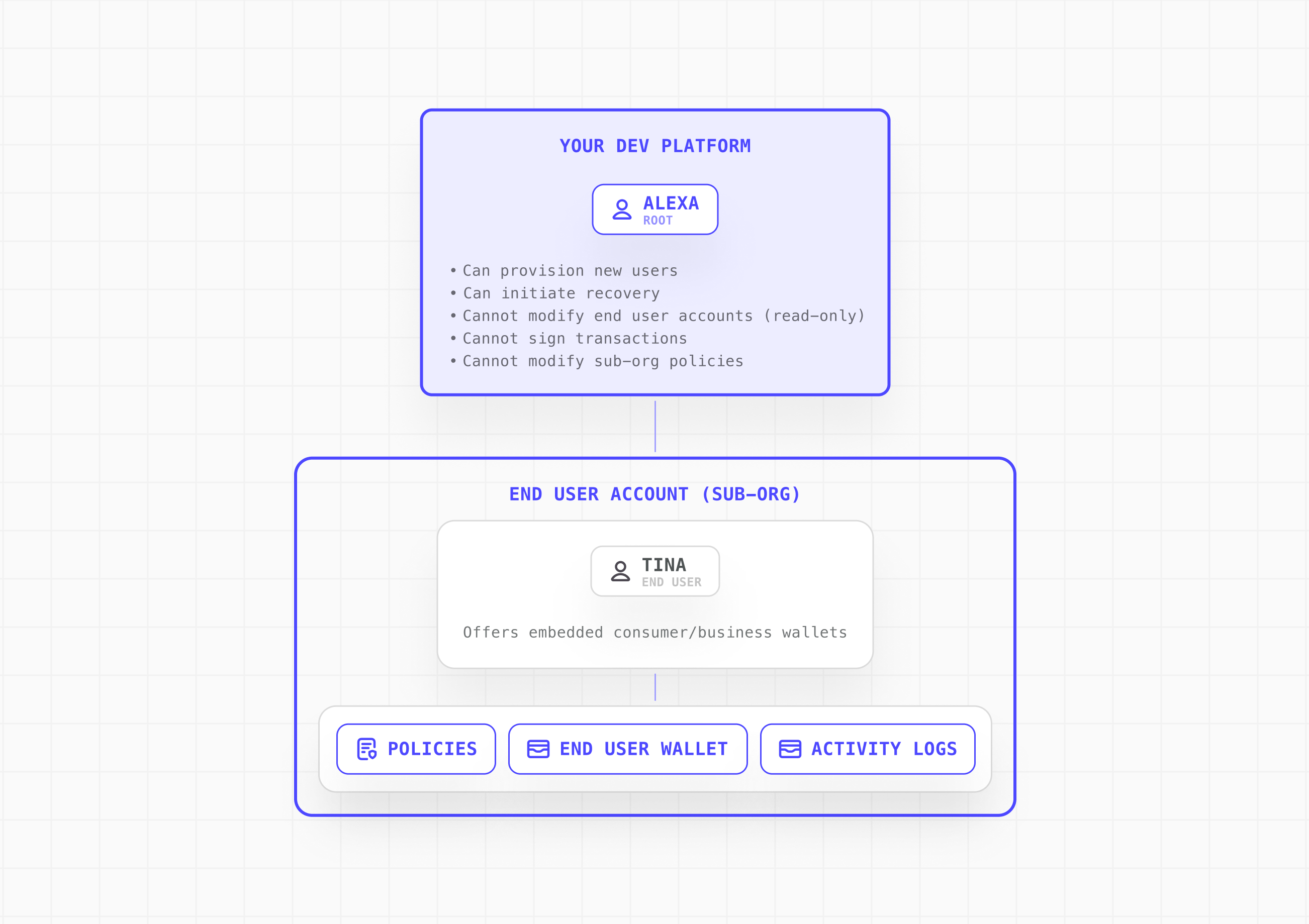
Transaction authorization flow
In the simplest configuration, your platform holds a separate scoped credential in each sub-org through Delegated Access, which lets you authorize signing for customers on an active plan.- The end user initiates a transaction from the wallet UI your SDK provides
- The request is signed by a credential in their sub-org: a passkey, a session key, or their own API key
- Your platform evaluates its own rules on the backend: billing status, risk controls, compliance checks
- The enclave signs and the transaction executes
- The activity rolls up to your parent organization for metering and billing
Implementation
Step 1: Create a sub-organization per end user
Map each end user to a sub-organization. Your parent organization has read-only access to sub-orgs and can initiate auth and recovery flows, but cannot sign transactions or modify policies within them. Creating a sub-org returns asubOrganizationId. You can use this identifier to map your users to a Turnkey sub-organization. Future API calls to Turnkey such as wallet lookups, policy changes, and signing will reference this sub-organization identifier.
In the baseline model, your platform is the sole root user of each sub-org, authenticated via API key. Decide up front what every sub-org gets by default: wallet structure, supported chains and accounts, and baseline policies.
- End-user authenticator. Add a passkey (or equivalent) as a second root user if you want users to hold their own signing key. See End-user co-signing.
- Delegated access. Add a scoped non-root API key via Delegated Access for backend-initiated workflows and for the usage your billing model depends on. Keep it tightly policy-scoped: it should never have broad signing authority or bypass user consent.
Step 2: Build your integration surface
Create the SDK, APIs, or UI components that developers will integrate with. Abstract Turnkey and expose only your platform’s intended wallet, auth, and signing flows.- Embedded Wallet Kit (EWK): Fork or wrap EWK components (authentication, wallet UI, approval prompts) with your branding.
- Backend service: Handle metering, billing, and activity monitoring through your backend, along with any approvals you have opted into.
- SDK abstraction layer: Wrap Turnkey’s SDK calls behind your own interface for full control over the developer experience.
Step 3: Wire the wallet into your platform flow
Integrate the wallet into your onboarding and runtime flows so every integration inherits a working embedded wallet.- Onboarding: Create the sub-org as part of user registration. The end user should experience this as a natural part of your sign-up flow.
- Client initialization: Initialize the Turnkey client with the user’s sub-org context on each session. Use sessions for batched signing workflows to reduce authentication friction.
- Transaction flow: Your backend receives the request, runs its checks, then submits the approval to Turnkey via API key.
- Recovery: Expose the export flow in your settings UI so users can self-serve wallet recovery if needed. Turnkey’s enclave encrypts the mnemonic to a user-generated target key via HPKE. Neither Turnkey nor your platform can view the exported material.
Additional security options
The setup above is the quickest way to get up and running with Wallet-as-a-Service. For additional layers of security and abuse protection, see the options below.End-user co-signing (2-of-2 root quorum)
Add the end user as a second root member and raise the quorum threshold to 2. With this model, every fund-moving transaction requires both the end user’s authenticator (passkey or equivalent) and your platform’s API key. Neither party can move funds unilaterally.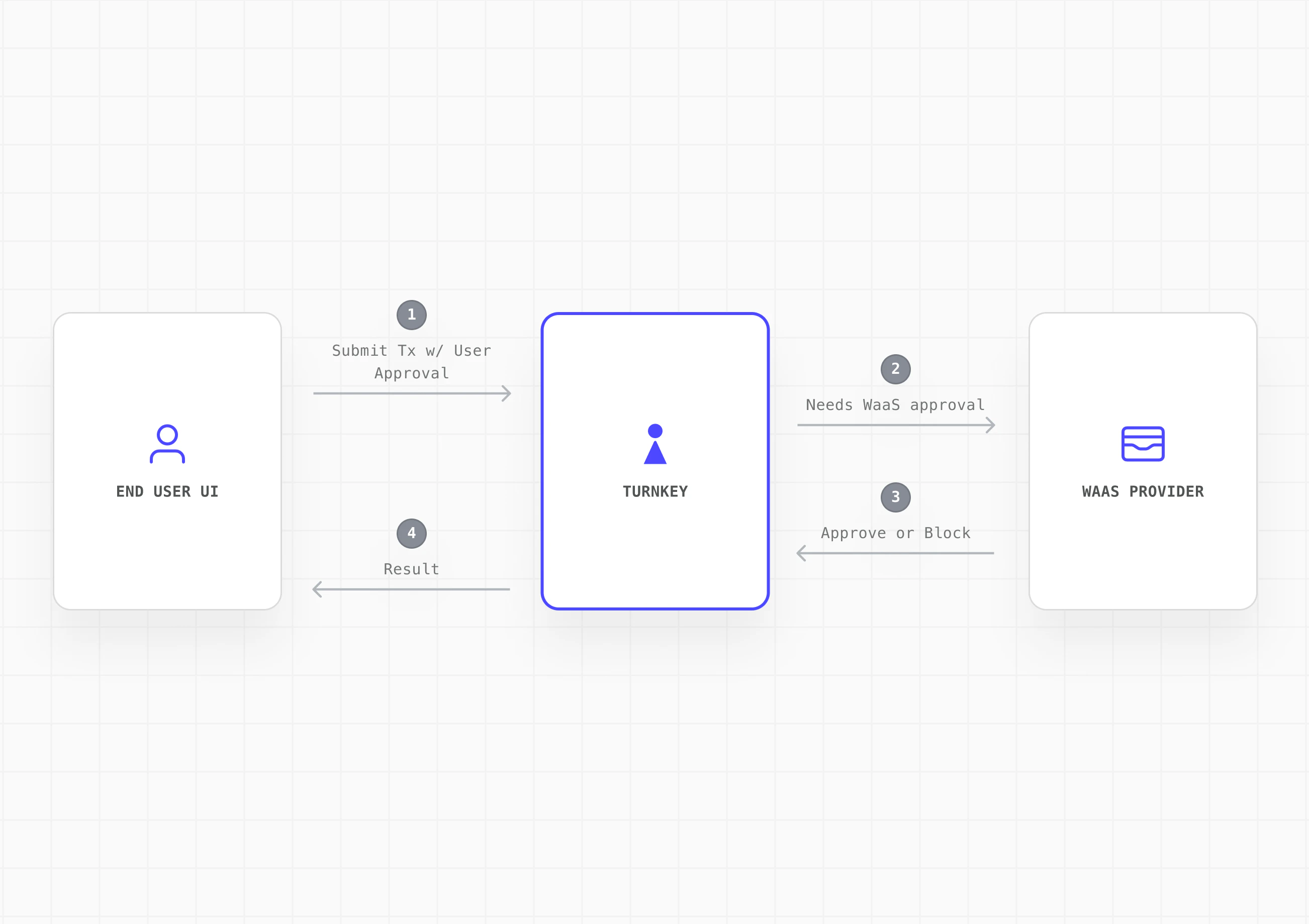
Proxying and IP allowlisting
Turnkey’s public API has an open CORS policy, so your SDK can POST signed requests straight toapi.turnkey.com. Routing them through your backend instead gives your platform a single egress point for every Turnkey call. At that entry point you can validate requests before forwarding them, apply rate limits per merchant or per user, persist activity results such as new wallet addresses, and feed your own monitoring.
Treat this as a soft gate. Requests are signed on the client, so your proxy can forward, drop, or delay a request but cannot alter it, and a client holding a valid credential can still reach Turnkey directly. Keep the enforceable controls in policies and use the proxy for operational visibility and gating.
IP allowlisting hardens the traffic that does originate from your servers. Define trusted CIDR blocks and requests from any other IP are rejected. Configure this at the organization level for all requests, or per API key to scope specific keys to specific environments. The org-level allowlist must be enabled for per-key rules to take effect.
Available to Enterprise clients on the Scale tier or higher.
See Proxying signed requests and IP Allowlist.
Captcha protection
Enable Cloudflare Turnstile to block bots and credential-stuffing attacks at the two highest-risk entry points: email/SMS OTP requests and new account signups. Configurable per organization in the Turnkey Dashboard.Enforcement is automatic only for
@turnkey/react-wallet-kit (v2.4.0+). If your platform builds its own UI on @turnkey/core, you must render the Turnstile widget and pass captcha tokens to the relevant SDK methods yourself.MFA policies
Require additional authentication factors for specific activities: high-value transfers, policy changes, or any condition you can express in policy language. MFA policies are created per user withCreateMfaPolicy and enforced at the user level, including root users. Each policy defines an ordered list of required steps, and each step accepts any of passkey, API key, session, email OTP, SMS OTP, or OAuth.
See Multi-Factor Authentication.
Least-privilege API key scoping
Use separate API-only users for different parts of your platform (onboarding, transaction approval, recovery). Restrict each key to only the activities it needs via policies. If a key is compromised, the blast radius is limited. See User best practices and Policies.Activity monitoring via webhooks
Subscribe toACTIVITY_UPDATES webhooks to receive real-time, Ed25519-signed notifications for every activity in your parent org and all sub-orgs from a single parent-owned endpoint. Use this to feed your own audit log, fraud detection, or alerting systems.
See Webhooks.