

 Home
HomeOverview
By default, Turnkey holds signing keys inside hardware-backed secure enclaves that Turnkey operates. For most customers, that’s the right trade-off: strong hardware isolation without having to run signing infrastructure yourself. Self-Hosted Signing lets you host the signing key inside your own Hardware Security Module (HSM), while continuing to use Turnkey for everything around signing: authentication, policy evaluation, transaction parsing, and broadcast. Compared to Turnkey’s default (keys in a Turnkey-operated secure enclave), HSM Signing gives you:- Regulatory posture. Many compliance regimes (FIPS 140-2 / 140-3, PCI, custody licensing frameworks) assume keys live in certified hardware under the regulated entity’s control. Running the signer inside your own HSM is a well-established, regulator-recognized pattern for meeting those expectations.
- Unilateral revocation. Because the credentials that let Turnkey reach your HSM live on your side, you can cut Turnkey’s signing access in seconds, with no coordination required.
- Self-hosted signing. The signing key is generated inside your HSM and unencrypted key material never exists outside it. Turnkey only ever holds key material in encrypted form that cannot be used without your HSM. Turnkey acts as an authentication and policy layer on top of your HSM, routing signature requests over an authenticated channel that you can cut off at any time.
Architecture
Self-Hosted Signing introduces one new Turnkey-provided component, the External Signer Daemon, that runs inside your own infrastructure and communicates with your HSM. An HSM is a tamper-resistant device whose only job is to generate, store, and use cryptographic keys. Applications don’t read keys out of an HSM. Instead, they send operations to it (“sign this digest”) and receive results. The private key never leaves the device. HSMs are certified against standards like FIPS 140-2 / 140-3 and are the hardware layer behind compliance regimes in payments, banking, certificate authorities, and custody. The request flow:- A request arrives at Turnkey. Turnkey runs authentication, policy evaluation, and transaction parsing exactly as it does today.
- When the request is ready to sign, Turnkey enqueues a signing task instead of sending it to a Turnkey-operated signer enclave.
- The External Signer Daemon, running inside your environment, pulls the task from Turnkey.
- The Daemon verifies the task was issued by Turnkey, then asks your HSM to sign.
- The HSM returns the signature to the Daemon. The Daemon signs the response (so Turnkey can prove it came from your Daemon) and posts it back to Turnkey.
- Turnkey finalizes the request and, if applicable, broadcasts to the network.
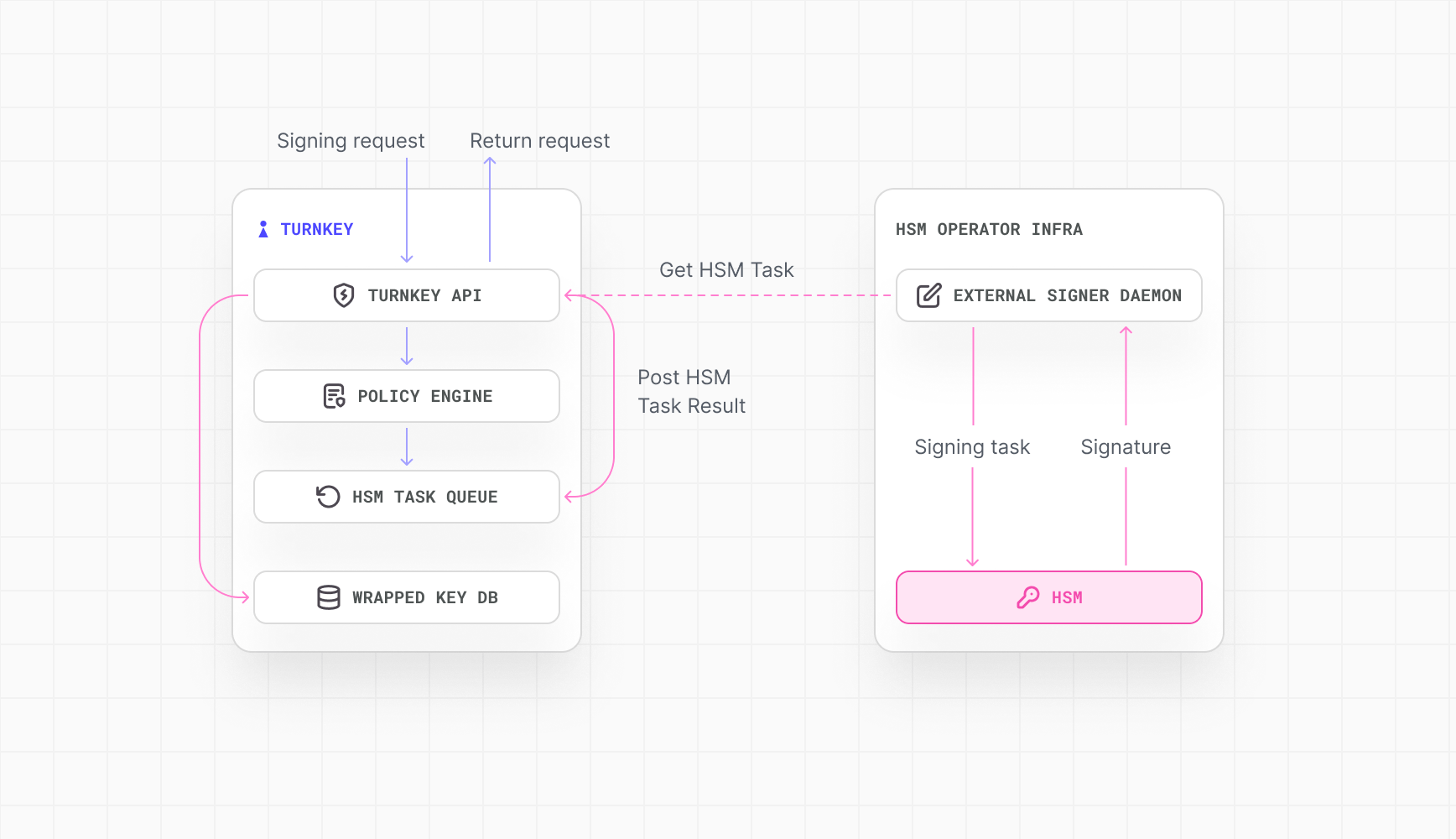
- The private keys never leave your HSM unencrypted. Turnkey sends a digest to sign; the HSM returns a signature.
- All Turnkey ↔ HSM traffic is egress-only from your side. Turnkey never calls into your network; the Daemon dials out to Turnkey.
- External verification. Every result posted back to Turnkey is signed by your External Signer Daemon and verified before it’s finalized. Any altered result will fail the signature check.
- Scales independently along two axes. The minimum deployment is one External Signer Daemon and one HSM. From there, the architecture supports 1) HSM’s running in high availability mode by putting multiple HSMs behind a single Daemon for HSM redundancy and failover and 2) horizontal Daemon scaling with multiple Daemons in front of your HSM fleet for throughput and Daemon redundancy. Horizontally scaled Daemons share the same External Signer Daemon signing key and HSM connection and pull from the same Turnkey queue. The system is designed to safely handle duplicate deliveries. If the same task reaches the HSM more than once, Turnkey uses only the first result, so you do not need to coordinate task assignment across Daemons. You can use either axis on its own or combine them.
Supported HSMs
The architecture is designed to be compatible with HSMs from any major cloud provider (e.g., AWS CloudHSM, Google Cloud HSM, Azure Managed HSM) or on-premises appliance (e.g., Thales Luna, Entrust nShield), as long as they are PKCS#11 compatible. Contact sales to learn more about supported HSMs, anything outside of PKCS#11 and alternative external signers.Getting set up
Setting up Self-Hosted Signing requires coordinated configuration in both your Turnkey account and your own environment.Within Turnkey
In your Turnkey organization:- Register your External Signer Daemon’s signing key. The Daemon has its own signing key that Turnkey uses to verify responses came from your deployment. You register the public key against your organization (or sub-organization) during onboarding using the
CreateExternalSigneractivity. - Enable HSM-backed wallet accounts. When you create a wallet account against this organization, you flag it as HSM-backed. Signing requests against those accounts are routed through your Daemon instead of a Turnkey-operated signer.
Within your environment
In your own infrastructure, you deploy and configure the External Signer Daemon alongside your HSM:- Provision an AES wrapping key. On your HSM provision a long-lived wrapping key to wrap keys created in the HSM. Turnkey recommends that
CKA_EXTRACTABLEis set false andCKA_SENSITIVEis set true for this key upon provisioning. - Deploy the External Signer Daemon. Turnkey distributes the Daemon binary. You run it in your environment on a host that can reach both your HSM and Turnkey’s API.
- Provide the PKCS#11 shared object for your HSM so the Daemon can speak to it.
- Configure the Daemon with the credentials and addressing it needs:
- HSM user PIN (for key creation and signing operations)
- Token serial number or slot id
- AES wrapping key id
- mTLS (or equivalent) certificates for the Daemon ↔ HSM channel
- The External Signer Daemon signing keypair
Key generation and storage
HSMs have limited internal storage, so customer keys are not persisted inside the HSM across sessions. The lifecycle is:- A key is generated inside the HSM on request.
- The HSM encrypts the key under the AES wrapping key that never leaves the HSM.
- The encrypted key is returned to the External Signer Daemon.
- The in-HSM copy is deleted at the end of the session. The key material only ever exists inside the HSM, and only for the duration of the session.
Backups
Responsibility for backups is split between you and Turnkey:- You back up: your HSM configuration, any key material managed on the HSM itself (per your HSM vendor’s backup / replication/ HA tooling) including the AES wrapping key, and encrypted key material in your own environment, as noted above.
- Turnkey backs up: the access-layer authentication mechanism, activity log, and Turnkey-side configuration (organization data, Daemon signing key registration, HSM-wallet metadata).