> ## Documentation Index
> Fetch the complete documentation index at: https://docs.turnkey.com/llms.txt
> Use this file to discover all available pages before exploring further.
# Enterprise Disaster Recovery
> Import and recover wallets with end-to-end encryption, quorum-controlled access, and a cryptographic audit trail.
export const SolutionCard = ({title, description, icon, href}) => {
return
;
};
export const FeatureCard = ({title, description, icon, logo, href}) => {
return
{logo ?  : }
: }
{title}
{description &&
{description}
}
;
};
Back up wallets on Turnkey and recover them when you need to for incident response, provider migration, and redundancy. All key material is encrypted directly to Turnkey's secure enclave using [HPKE](/security/enclave-secure-channels), and every recovery operation is cryptographically stamped. For an overview of Turnkey's key management capabilities, see the [Key Management Overview](/solutions/key-management/overview).
## Key implementation decisions
| Decision | What to consider | Learn more |
| :--------------------- | :--------------------------------------------------------------------------------------------------------------------------------------------------------- | :--------------------------------------------------------------------------------------------------------------------------------------------- |
| **Organization setup** | Create dedicated recovery users with limited permissions. Distribute authenticators (passkeys, YubiKeys) across geographic locations where possible. | [Organizations](/features/organizations) |
| **Root quorum** | Require multiple approvers for sensitive operations to prevent any single credential compromise from triggering unauthorized recovery. | [Root Quorum](/features/users/root-quorum) |
| **Recovery policies** | Restrict what can be done with recovered wallets: limit fund movement to allowed addresses, require multi-party approval, scope signing by chain or value. | [Policy Engine](/features/policies/overview), [Signing Control](/features/policies/examples/signing-control) |
| **Import method** | Use the NodeJS server SDK for the full import flow including encryption and secure transport, or the React Wallet Kit for client-side import. | [Import Wallets](/features/wallets/import-wallets), [SDK Server](https://github.com/tkhq/sdk/tree/main/examples/key-management/import-in-node) |
## Example: treasury recovery
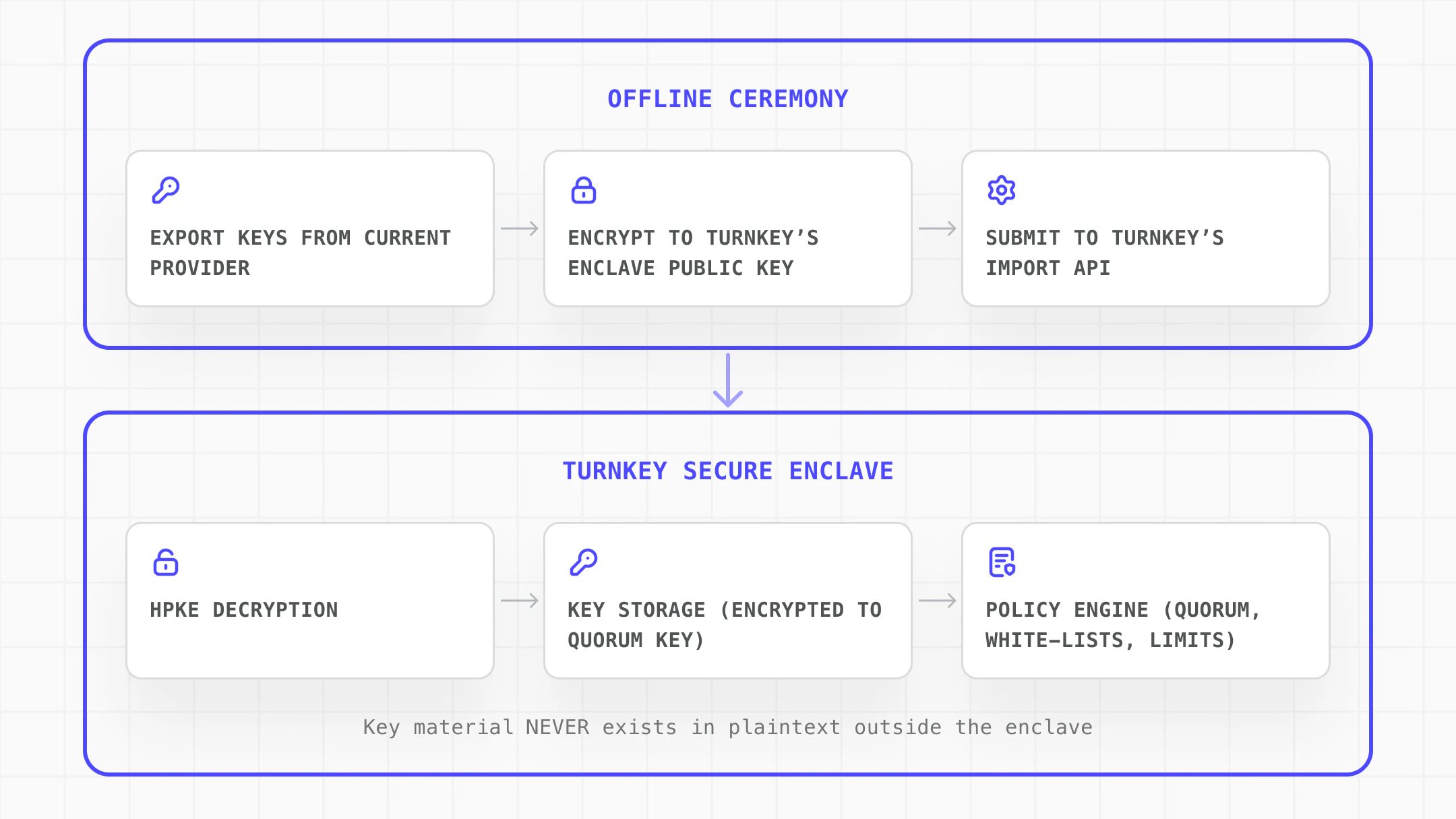
Import wallet keys into Turnkey's secure enclave ahead of time. If a key holder becomes unavailable or a hardware wallet fails, recover treasury assets with quorum-controlled access and policy-restricted fund movement.
 | Need | How Turnkey solves it |
| :----------------------------------------------------- | :---------------------------------------------------------------------------------------------------------------------------------------------------------- |
| Import keys with no plaintext exposure in transit | All key material is encrypted directly to the enclave using [HPKE](/security/enclave-secure-channels). Plaintext never exists outside the enclave boundary. |
| No single person can unilaterally move recovered funds | [Quorum approval](/features/users/root-quorum) requires multiple approvers for sensitive operations |
| Restrict what can be done with recovered wallets | [Policies](/features/policies/overview) scope fund movement to allowed addresses, chains, and value thresholds |
| Cryptographic audit trail | Every recovery operation is cryptographically stamped, ensuring recoveries cannot be tampered with |
| Secondary signing path must always be available | Import backup copies of critical wallet keys so operations continue if a primary signer goes down |
### Implementation steps
Explore the complete implementation in the [GitHub disaster-recovery example](https://github.com/tkhq/sdk/tree/main/examples/key-management/disaster-recovery).
Create a [Turnkey organization](https://app.turnkey.com/dashboard/auth/initial) and establish the security foundation for recovery operations:
* Create dedicated recovery users with specific, limited permissions
* Configure the [Root Quorum](/features/users/root-quorum) to require multiple approvers for sensitive operations
* Distribute authenticators ([passkeys](/features/authentication/passkeys/introduction), YubiKeys) across geographic locations
* Define [policies](/features/policies/examples/signing-control) that restrict what can be done with recovered wallets
Use the [NodeJS server SDK](https://github.com/tkhq/sdk/tree/main/examples/key-management/import-in-node) to initialize the import and encrypt the wallet material to Turnkey's enclave:
```ts theme={"system"}
import { Turnkey } from "@turnkey/sdk-server";
import { encryptPrivateKeyToBundle, encryptWalletToBundle } from "@turnkey/crypto";
const initResult = await turnkeyClient.apiClient().initImportWallet({
userId,
});
const walletBundle = await encryptWalletToBundle({
mnemonic,
importBundle: initResult.importBundle,
userId,
organizationId,
});
```
Use [importWallet()](/generated-docs/core/turnkey-client-import-wallet) to transmit the encrypted bundle. The enclave decrypts and stores the key material. All fund movements are logged with cryptographic signatures.
```ts theme={"system"}
const walletImportResult = await turnkeyClient.apiClient().importWallet({
userId: userId,
walletName: "Your imported wallet!",
encryptedBundle: walletBundle,
accounts: [],
});
```
## Next steps
| Need | How Turnkey solves it |
| :----------------------------------------------------- | :---------------------------------------------------------------------------------------------------------------------------------------------------------- |
| Import keys with no plaintext exposure in transit | All key material is encrypted directly to the enclave using [HPKE](/security/enclave-secure-channels). Plaintext never exists outside the enclave boundary. |
| No single person can unilaterally move recovered funds | [Quorum approval](/features/users/root-quorum) requires multiple approvers for sensitive operations |
| Restrict what can be done with recovered wallets | [Policies](/features/policies/overview) scope fund movement to allowed addresses, chains, and value thresholds |
| Cryptographic audit trail | Every recovery operation is cryptographically stamped, ensuring recoveries cannot be tampered with |
| Secondary signing path must always be available | Import backup copies of critical wallet keys so operations continue if a primary signer goes down |
### Implementation steps
Explore the complete implementation in the [GitHub disaster-recovery example](https://github.com/tkhq/sdk/tree/main/examples/key-management/disaster-recovery).
Create a [Turnkey organization](https://app.turnkey.com/dashboard/auth/initial) and establish the security foundation for recovery operations:
* Create dedicated recovery users with specific, limited permissions
* Configure the [Root Quorum](/features/users/root-quorum) to require multiple approvers for sensitive operations
* Distribute authenticators ([passkeys](/features/authentication/passkeys/introduction), YubiKeys) across geographic locations
* Define [policies](/features/policies/examples/signing-control) that restrict what can be done with recovered wallets
Use the [NodeJS server SDK](https://github.com/tkhq/sdk/tree/main/examples/key-management/import-in-node) to initialize the import and encrypt the wallet material to Turnkey's enclave:
```ts theme={"system"}
import { Turnkey } from "@turnkey/sdk-server";
import { encryptPrivateKeyToBundle, encryptWalletToBundle } from "@turnkey/crypto";
const initResult = await turnkeyClient.apiClient().initImportWallet({
userId,
});
const walletBundle = await encryptWalletToBundle({
mnemonic,
importBundle: initResult.importBundle,
userId,
organizationId,
});
```
Use [importWallet()](/generated-docs/core/turnkey-client-import-wallet) to transmit the encrypted bundle. The enclave decrypts and stores the key material. All fund movements are logged with cryptographic signatures.
```ts theme={"system"}
const walletImportResult = await turnkeyClient.apiClient().importWallet({
userId: userId,
walletName: "Your imported wallet!",
encryptedBundle: walletBundle,
accounts: [],
});
```
## Next steps

