{logo ?  : }
: }
: }
{title}
{description &&
{description}
}
: }
 ### Transaction authorization flow
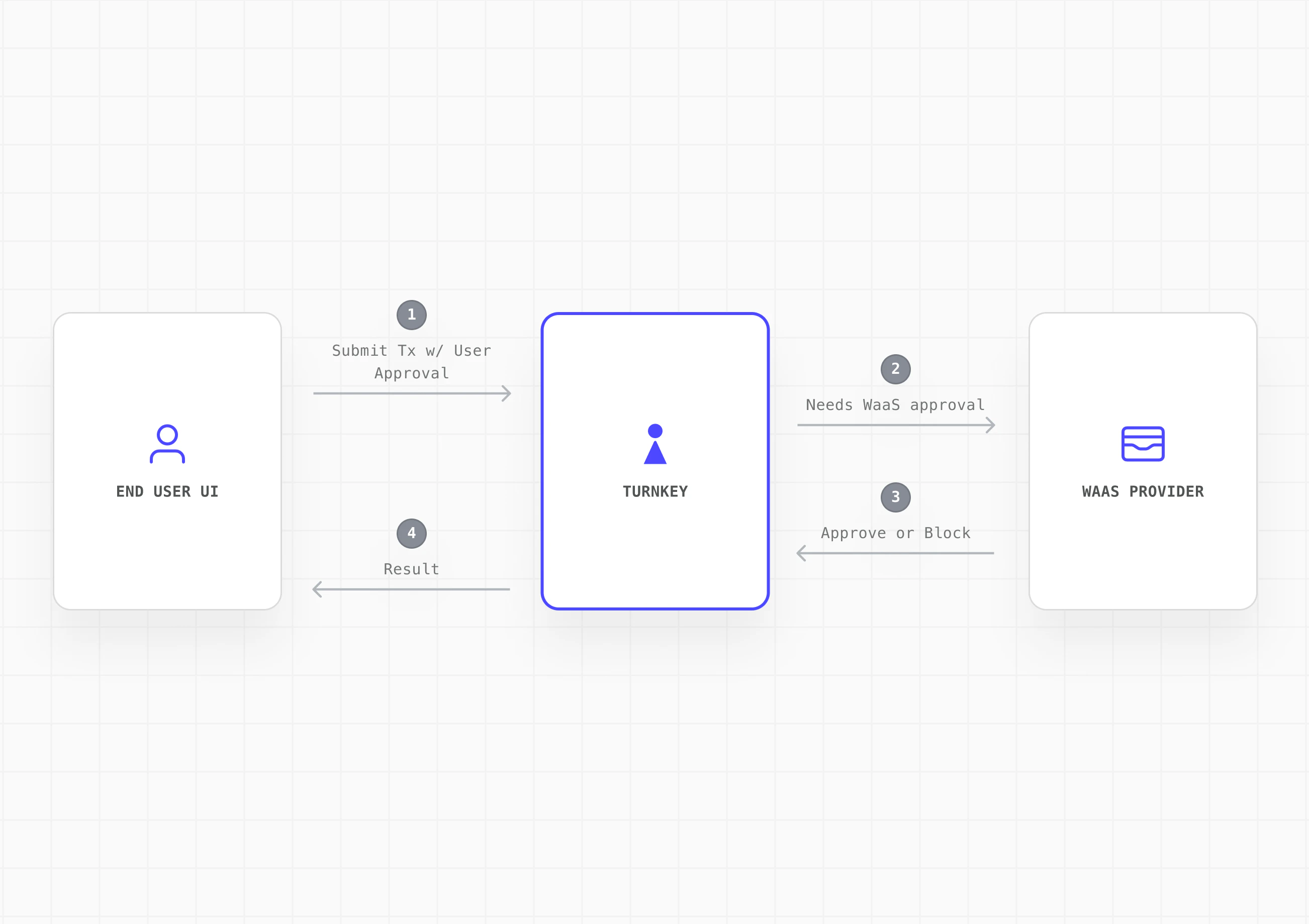
1. End user initiates a transaction from your embedded wallet UI
2. End user approves via their authenticator (e.g. passkey). Turnkey records the activity as partially approved
3. Your platform evaluates on its backend: billing status, risk/compliance rules, and any other checks
4. Your platform approves via API key and the transaction executes
5. If the platform withholds approval, the transaction does not execute
### Transaction authorization flow
1. End user initiates a transaction from your embedded wallet UI
2. End user approves via their authenticator (e.g. passkey). Turnkey records the activity as partially approved
3. Your platform evaluates on its backend: billing status, risk/compliance rules, and any other checks
4. Your platform approves via API key and the transaction executes
5. If the platform withholds approval, the transaction does not execute
 See [Activities and approvals](/get-started/about-turnkey#activities) and [Root quorum](/features/users/root-quorum).
## Implementation
### Step 1: Define the tenant model
Map each end user to a [sub-organization](/features/sub-organizations). One sub-org per end user.
* **Isolated tenants:** Each sub-org is a self-contained data boundary with wallets, policies, authenticators, and activity logs fully isolated from one another.
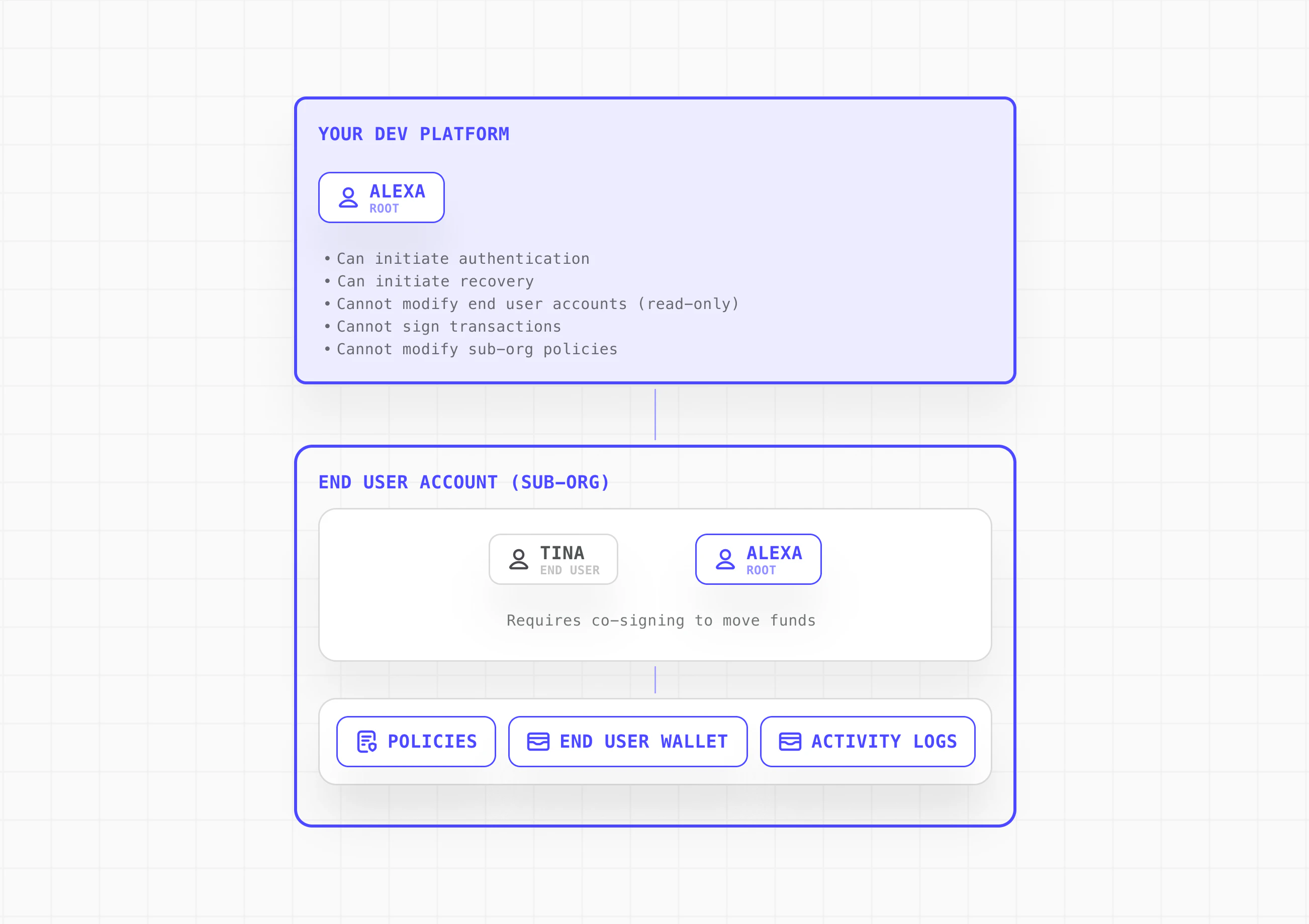
* **Scoped parent org permissions:** Your parent organization has read-only access to sub-orgs and can initiate auth and recovery flows, but cannot sign transactions or modify policies within them.
* **External mapping:** Track the relationship between your platform's user IDs and their corresponding Turnkey sub-org IDs in your own database.
See [Sub-organizations](/features/sub-organizations) and [Root quorum](/features/users/root-quorum).
### Step 2: Design the sub-organization control model
Define what lives inside each sub-org and how control is shared between your platform and the end user.
* **End user (root):** Authenticated via passkey or equivalent user-controlled authenticator.
* **Platform provider (root):** Authenticated via API key. Used to approve or block transactions based on your service rules.
* **Delegated access (optional):** For automation or backend-initiated workflows, add a scoped non-root API key via [Delegated Access](/features/policies/delegated-access/overview). This must be tightly policy-scoped and should never have broad signing authority or bypass user consent.
See [Delegated Access](/features/policies/delegated-access/overview) and [Policies](/features/policies/overview).
### Step 3: Create sub-org with wallet and export policy
Specify what gets created in every sub-org by default: wallet structure, supported chains/accounts, and baseline policies.
For the 2-of-2 quorum model, establish the threshold last so your platform can configure policies (including export) with only your platform's approval. Once the 2-of-2 quorum is established, the end user can trigger exports via the export policy without needing your platform's co-signature. This keeps the co-managed model non-custodial: end users can always export their keys and access their funds directly, independent of your platform.
| Step | Action | Quorum State |
| ---- | -------------------------------------------- | ------------ |
| 3a | Create sub-org with both root users + wallet | 1-of-2 |
| 3b | Create export policy for end user | 1-of-2 |
| 3c | Update threshold to 2 | **2-of-2** |
**3a. Create sub-org with both root users at 1-of-2 threshold**
```javascript theme={"system"}
const subOrg = await turnkeyClient.createSubOrganization({
parameters: {
subOrganizationName: `User Wallet - ${userId}`,
rootUsers: [
{ userName: "Platform", apiKeys: [{ publicKey: PROVIDER_KEY }] },
{
userName: "End User",
authenticators: [
{
/* passkey */
},
],
},
],
rootQuorumThreshold: 1,
wallet: {
walletName: "Primary Wallet",
accounts: [
{
/* eth account */
},
],
},
},
});
```
**3b. Create export policy (user escape hatch)**
```javascript theme={"system"}
await turnkeyClient.createPolicy({
organizationId: subOrgId,
parameters: {
policyName: "Allow User Wallet Export",
effect: "EFFECT_ALLOW",
consensus: `approvers.any(user, user.id == '${endUserId}')`,
condition: `activity.type == 'ACTIVITY_TYPE_EXPORT_WALLET'
&& wallet.id == '${walletId}'`,
},
});
```
**3c. Raise threshold to 2-of-2**
```javascript theme={"system"}
await turnkeyClient.updateRootQuorum({
organizationId: subOrgId,
parameters: {
threshold: 2,
userIds: [providerUserId, endUserId],
},
});
```
See [Export wallets](/features/wallets/export-wallets) and [Policy examples](/features/policies/examples/access-control).
### Step 4: Build your integration surface
Create the SDK, APIs, or UI components that downstream developers will integrate with. Abstract Turnkey and expose only your platform's intended wallet, auth, and signing flows.
* **Embedded Wallet Kit (EWK):** Fork or wrap [EWK](/solutions/embedded-wallets/integration-guide/react/index) components (authentication, wallet UI, approval prompts) with your branding. Surface "pending platform approval" states in the transaction flow.
* **Backend service:** Handle platform root approvals (via API key), billing and risk evaluation, and activity monitoring through your backend.
* **SDK abstraction layer:** Wrap Turnkey's SDK calls behind your own interface for full control over the developer experience.
See [Embedded Wallet Kit](/solutions/embedded-wallets/integration-guide/react/index) and [SDK Reference](/sdks/introduction).
### Step 5: Wire the wallet into your platform flow
Integrate the wallet into your onboarding and runtime flows so every downstream integration inherits a working embedded wallet.
* **Onboarding:** Handle Turnkey org setup, auth configuration, and the staged sub-org creation flow as part of user registration. The end user should experience passkey registration as a natural part of sign-up.
* **Client initialization:** Initialize the Turnkey client with the user's sub-org context on each session. Use [sessions](/features/authentication/sessions) for batched signing workflows to reduce authentication friction.
* **Transaction flow:** Surface the approval prompt via EWK components, submit the user's approval to Turnkey, run your backend checks, then co-sign or withhold.
* **Recovery:** Expose the export flow in your settings UI so users can self-serve wallet recovery. Turnkey's enclave encrypts the mnemonic to a user-generated target key via HPKE. Neither Turnkey nor your platform can view the exported material.
## Next steps
See [Activities and approvals](/get-started/about-turnkey#activities) and [Root quorum](/features/users/root-quorum).
## Implementation
### Step 1: Define the tenant model
Map each end user to a [sub-organization](/features/sub-organizations). One sub-org per end user.
* **Isolated tenants:** Each sub-org is a self-contained data boundary with wallets, policies, authenticators, and activity logs fully isolated from one another.
* **Scoped parent org permissions:** Your parent organization has read-only access to sub-orgs and can initiate auth and recovery flows, but cannot sign transactions or modify policies within them.
* **External mapping:** Track the relationship between your platform's user IDs and their corresponding Turnkey sub-org IDs in your own database.
See [Sub-organizations](/features/sub-organizations) and [Root quorum](/features/users/root-quorum).
### Step 2: Design the sub-organization control model
Define what lives inside each sub-org and how control is shared between your platform and the end user.
* **End user (root):** Authenticated via passkey or equivalent user-controlled authenticator.
* **Platform provider (root):** Authenticated via API key. Used to approve or block transactions based on your service rules.
* **Delegated access (optional):** For automation or backend-initiated workflows, add a scoped non-root API key via [Delegated Access](/features/policies/delegated-access/overview). This must be tightly policy-scoped and should never have broad signing authority or bypass user consent.
See [Delegated Access](/features/policies/delegated-access/overview) and [Policies](/features/policies/overview).
### Step 3: Create sub-org with wallet and export policy
Specify what gets created in every sub-org by default: wallet structure, supported chains/accounts, and baseline policies.
For the 2-of-2 quorum model, establish the threshold last so your platform can configure policies (including export) with only your platform's approval. Once the 2-of-2 quorum is established, the end user can trigger exports via the export policy without needing your platform's co-signature. This keeps the co-managed model non-custodial: end users can always export their keys and access their funds directly, independent of your platform.
| Step | Action | Quorum State |
| ---- | -------------------------------------------- | ------------ |
| 3a | Create sub-org with both root users + wallet | 1-of-2 |
| 3b | Create export policy for end user | 1-of-2 |
| 3c | Update threshold to 2 | **2-of-2** |
**3a. Create sub-org with both root users at 1-of-2 threshold**
```javascript theme={"system"}
const subOrg = await turnkeyClient.createSubOrganization({
parameters: {
subOrganizationName: `User Wallet - ${userId}`,
rootUsers: [
{ userName: "Platform", apiKeys: [{ publicKey: PROVIDER_KEY }] },
{
userName: "End User",
authenticators: [
{
/* passkey */
},
],
},
],
rootQuorumThreshold: 1,
wallet: {
walletName: "Primary Wallet",
accounts: [
{
/* eth account */
},
],
},
},
});
```
**3b. Create export policy (user escape hatch)**
```javascript theme={"system"}
await turnkeyClient.createPolicy({
organizationId: subOrgId,
parameters: {
policyName: "Allow User Wallet Export",
effect: "EFFECT_ALLOW",
consensus: `approvers.any(user, user.id == '${endUserId}')`,
condition: `activity.type == 'ACTIVITY_TYPE_EXPORT_WALLET'
&& wallet.id == '${walletId}'`,
},
});
```
**3c. Raise threshold to 2-of-2**
```javascript theme={"system"}
await turnkeyClient.updateRootQuorum({
organizationId: subOrgId,
parameters: {
threshold: 2,
userIds: [providerUserId, endUserId],
},
});
```
See [Export wallets](/features/wallets/export-wallets) and [Policy examples](/features/policies/examples/access-control).
### Step 4: Build your integration surface
Create the SDK, APIs, or UI components that downstream developers will integrate with. Abstract Turnkey and expose only your platform's intended wallet, auth, and signing flows.
* **Embedded Wallet Kit (EWK):** Fork or wrap [EWK](/solutions/embedded-wallets/integration-guide/react/index) components (authentication, wallet UI, approval prompts) with your branding. Surface "pending platform approval" states in the transaction flow.
* **Backend service:** Handle platform root approvals (via API key), billing and risk evaluation, and activity monitoring through your backend.
* **SDK abstraction layer:** Wrap Turnkey's SDK calls behind your own interface for full control over the developer experience.
See [Embedded Wallet Kit](/solutions/embedded-wallets/integration-guide/react/index) and [SDK Reference](/sdks/introduction).
### Step 5: Wire the wallet into your platform flow
Integrate the wallet into your onboarding and runtime flows so every downstream integration inherits a working embedded wallet.
* **Onboarding:** Handle Turnkey org setup, auth configuration, and the staged sub-org creation flow as part of user registration. The end user should experience passkey registration as a natural part of sign-up.
* **Client initialization:** Initialize the Turnkey client with the user's sub-org context on each session. Use [sessions](/features/authentication/sessions) for batched signing workflows to reduce authentication friction.
* **Transaction flow:** Surface the approval prompt via EWK components, submit the user's approval to Turnkey, run your backend checks, then co-sign or withhold.
* **Recovery:** Expose the export flow in your settings UI so users can self-serve wallet recovery. Turnkey's enclave encrypts the mnemonic to a user-generated target key via HPKE. Neither Turnkey nor your platform can view the exported material.
## Next steps