> ## Documentation Index
> Fetch the complete documentation index at: https://docs.turnkey.com/llms.txt
> Use this file to discover all available pages before exploring further.
# Using the CLI
> This quickstart will guide you through Turnkey’s onboarding, adding an API key, creating a wallet, and signing your first Ethereum transaction.
## Create your Turnkey organization
* Visit
[app.turnkey.com/dashboard/v2/auth/initial](https://app.turnkey.com/dashboard/v2/auth/initial) and
enter your email address
* Confirm your email by clicking on the link inside of the confirmation email
* Follow the prompts to add your first authenticator and create your organization
## Find your organization ID
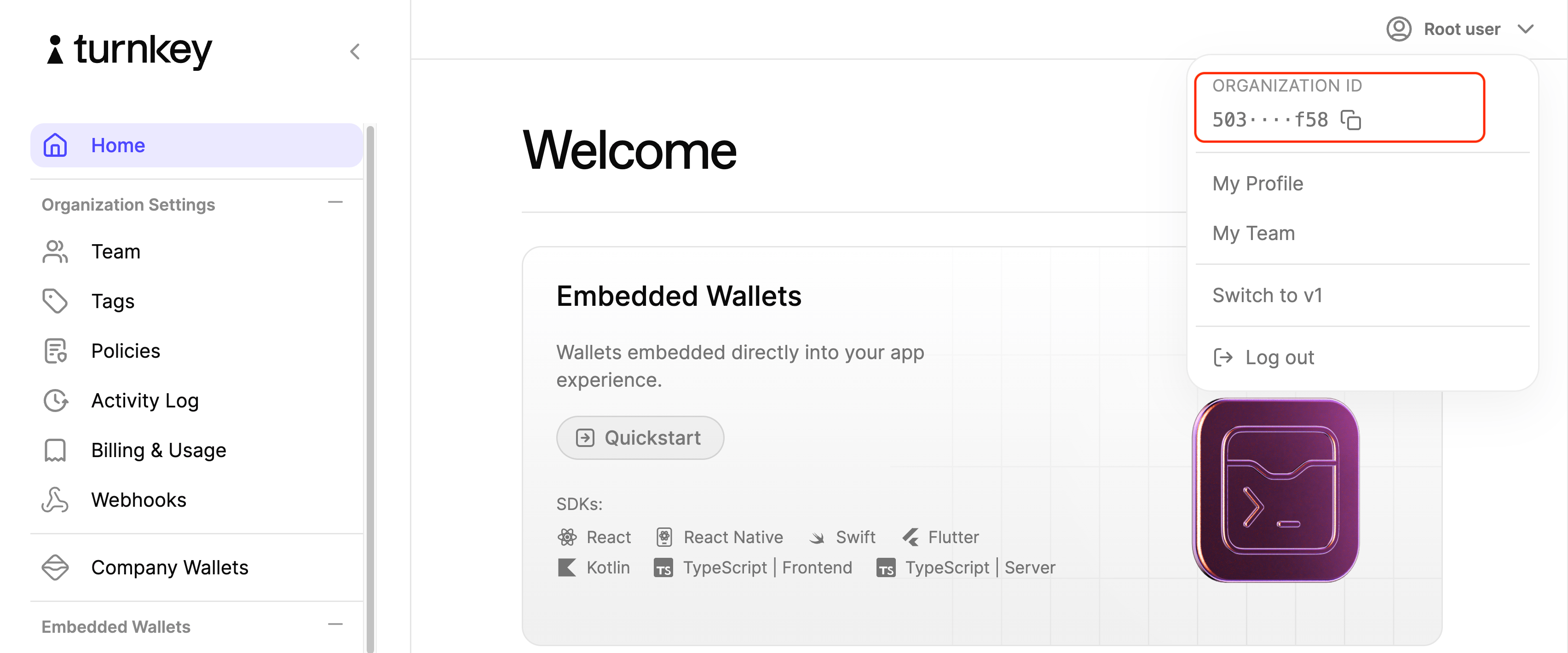
All API requests require an organization ID. Yours can be located in the user dropdown menu at the
top right corner of the dashboard.
 For convenience, it's worth setting this as a permanent shell variable:
```bash theme={"system"}
export ORGANIZATION_ID=""
```
## Add an API key
Turnkey API Keys are generic public / private key pairs that allow you to make requests to our API.
To generate a new key pair, we'll use the Turnkey CLI.
#### Installing `turnkey`
```bash theme={"system"}
brew install tkhq/tap/turnkey
```
We are employing [Homebrew](https://brew.sh/) in this guide as a quick and easy install path. For an
installation path that **requires no trust in external parties**, refer to our
[CLI repo](https://github.com/tkhq/tkcli).
#### Generate an API key
```bash theme={"system"}
turnkey generate api-key --organization $ORGANIZATION_ID --key-name quickstart
```
When you run this command, Turnkey’s CLI generates an API key pair and **stores the API private key
locally**. Copy the `publicKey` field in the output. In the next step, we'll add this to our User.
#### Add your public API key
Navigate to your user page by clicking on "My Profile" in the user dropdown menu.
For convenience, it's worth setting this as a permanent shell variable:
```bash theme={"system"}
export ORGANIZATION_ID=""
```
## Add an API key
Turnkey API Keys are generic public / private key pairs that allow you to make requests to our API.
To generate a new key pair, we'll use the Turnkey CLI.
#### Installing `turnkey`
```bash theme={"system"}
brew install tkhq/tap/turnkey
```
We are employing [Homebrew](https://brew.sh/) in this guide as a quick and easy install path. For an
installation path that **requires no trust in external parties**, refer to our
[CLI repo](https://github.com/tkhq/tkcli).
#### Generate an API key
```bash theme={"system"}
turnkey generate api-key --organization $ORGANIZATION_ID --key-name quickstart
```
When you run this command, Turnkey’s CLI generates an API key pair and **stores the API private key
locally**. Copy the `publicKey` field in the output. In the next step, we'll add this to our User.
#### Add your public API key
Navigate to your user page by clicking on "My Profile" in the user dropdown menu.
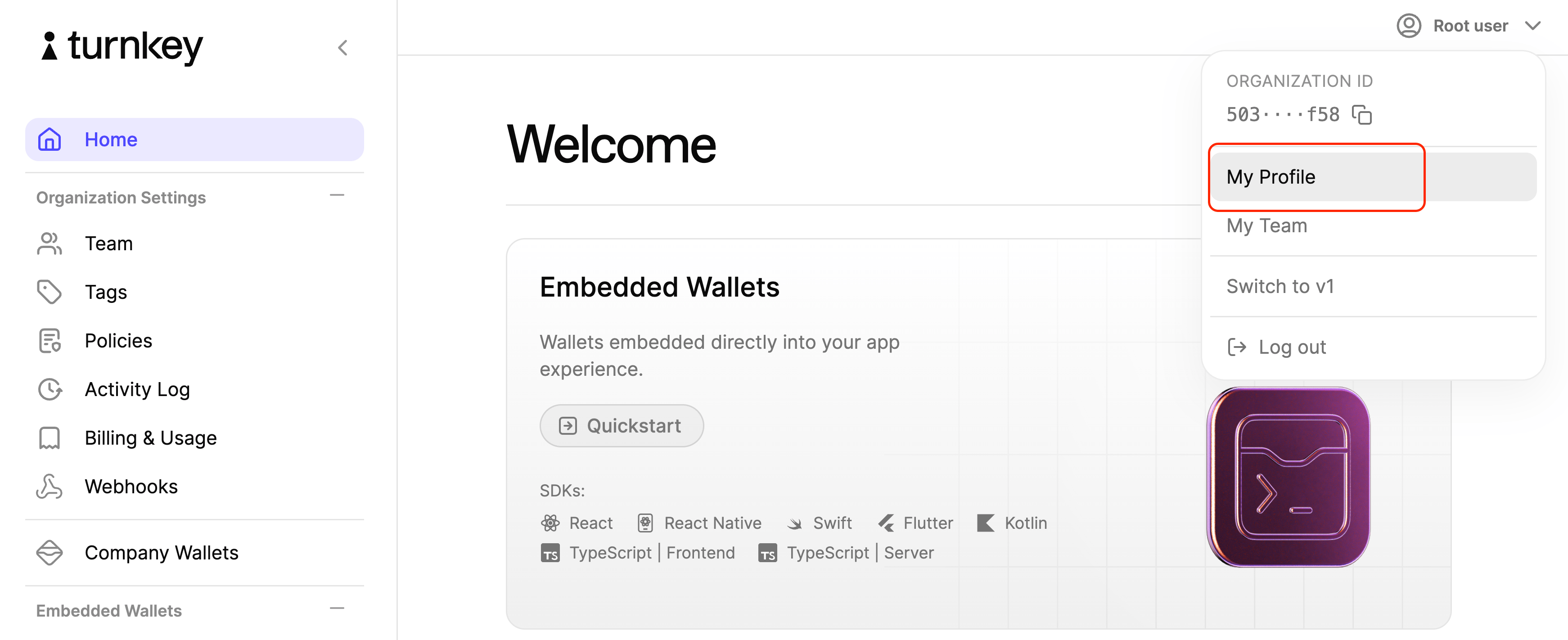 Click on "New API key" and click "+ Advanced Settings" to add the CLI-generated public API key.
You'll be required to authenticate with the same authenticator used during onboarding. After this
succeeds, you should be all set to interact with our API.
NOTES:
* if you would like to manually copy your locally stored public/private API key files (e.g.
`key.public`, `key.private`), you will have to save the files without newlines (which occupy extra
bytes). For example, for VIM, use `:set binary noeol` or `:set binary noendofline` before writing.
## Create a wallet
Wallets are collections of cryptographic key pairs typically used for sending and receiving digital
assets. To create one, we need to provide a name:
```bash theme={"system"}
turnkey wallets create --name default --key-name quickstart
```
## Create an Ethereum account
To create a cryptographic key pair on our new Wallet, we need to pass our desired address format:
```bash theme={"system"}
turnkey wallets accounts create --wallet default --address-format ADDRESS_FORMAT_ETHEREUM --key-name quickstart
```
This command will produce an Ethereum address (e.g. `0x08cb1216C95149DF66978b574E484869512CE2bF`)
that we'll need to sign a transaction. You can see your new Wallet account with:
```bash theme={"system"}
turnkey wallets accounts list --wallet default --key-name quickstart
```
## Sign a transaction
Now you can sign an Ethereum transaction with this new address with our
[`sign_transaction` endpoint](/api-reference/activities/sign-transaction). Make sure to replace the
`unsignedTransaction` below with your own. You can use our
[simple transaction generator](https://build.tx.xyz) if you need a quick transaction for testing:
```json theme={"system"}
turnkey request --path /public/v1/submit/sign_transaction --body '{
"timestampMs": "'"$(date +%s)"'000",
"type": "ACTIVITY_TYPE_SIGN_TRANSACTION_V2",
"organizationId": "'"$ORGANIZATION_ID"'",
"parameters": {
"type": "TRANSACTION_TYPE_ETHEREUM",
"signWith": "",
"unsignedTransaction": ""
}
}' --key-name quickstart
```
If you'd like to broadcast your transaction, you can easily do so via
[Etherscan](https://etherscan.io/pushTx).
## Next steps
* Check out our [examples](/getting-started/examples) to see what can be built
* Learn more about [Organizations](/concepts/organizations) and [Wallets](/concepts/wallets)
* See our [API design](/developer-reference/api-overview/intro) or dive into our
[API reference](/api-reference/overview)
Click on "New API key" and click "+ Advanced Settings" to add the CLI-generated public API key.
You'll be required to authenticate with the same authenticator used during onboarding. After this
succeeds, you should be all set to interact with our API.
NOTES:
* if you would like to manually copy your locally stored public/private API key files (e.g.
`key.public`, `key.private`), you will have to save the files without newlines (which occupy extra
bytes). For example, for VIM, use `:set binary noeol` or `:set binary noendofline` before writing.
## Create a wallet
Wallets are collections of cryptographic key pairs typically used for sending and receiving digital
assets. To create one, we need to provide a name:
```bash theme={"system"}
turnkey wallets create --name default --key-name quickstart
```
## Create an Ethereum account
To create a cryptographic key pair on our new Wallet, we need to pass our desired address format:
```bash theme={"system"}
turnkey wallets accounts create --wallet default --address-format ADDRESS_FORMAT_ETHEREUM --key-name quickstart
```
This command will produce an Ethereum address (e.g. `0x08cb1216C95149DF66978b574E484869512CE2bF`)
that we'll need to sign a transaction. You can see your new Wallet account with:
```bash theme={"system"}
turnkey wallets accounts list --wallet default --key-name quickstart
```
## Sign a transaction
Now you can sign an Ethereum transaction with this new address with our
[`sign_transaction` endpoint](/api-reference/activities/sign-transaction). Make sure to replace the
`unsignedTransaction` below with your own. You can use our
[simple transaction generator](https://build.tx.xyz) if you need a quick transaction for testing:
```json theme={"system"}
turnkey request --path /public/v1/submit/sign_transaction --body '{
"timestampMs": "'"$(date +%s)"'000",
"type": "ACTIVITY_TYPE_SIGN_TRANSACTION_V2",
"organizationId": "'"$ORGANIZATION_ID"'",
"parameters": {
"type": "TRANSACTION_TYPE_ETHEREUM",
"signWith": "",
"unsignedTransaction": ""
}
}' --key-name quickstart
```
If you'd like to broadcast your transaction, you can easily do so via
[Etherscan](https://etherscan.io/pushTx).
## Next steps
* Check out our [examples](/getting-started/examples) to see what can be built
* Learn more about [Organizations](/concepts/organizations) and [Wallets](/concepts/wallets)
* See our [API design](/developer-reference/api-overview/intro) or dive into our
[API reference](/api-reference/overview)