> ## Documentation Index
> Fetch the complete documentation index at: https://docs.turnkey.com/llms.txt
> Use this file to discover all available pages before exploring further.
# Export wallets
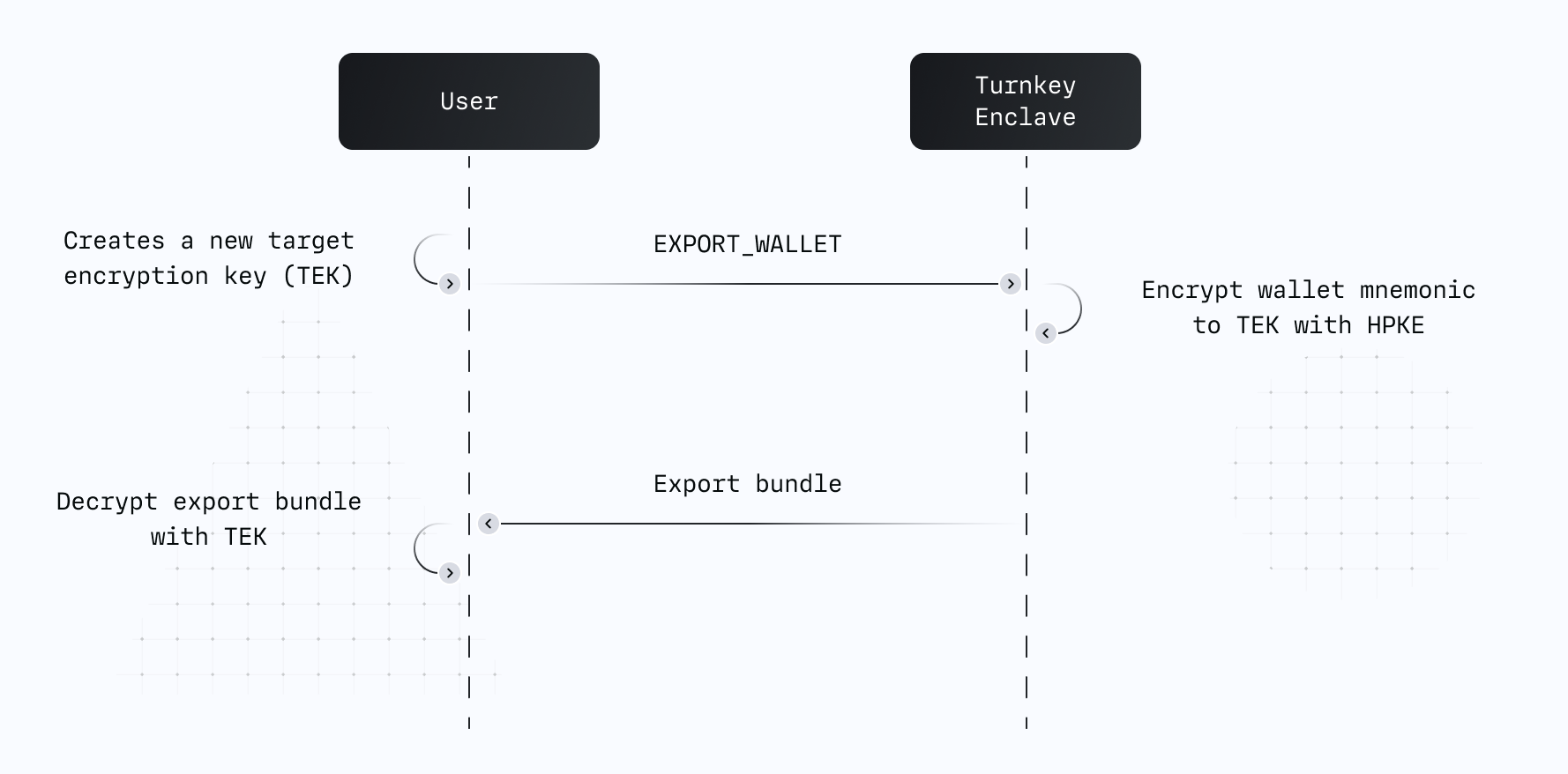
The process of exporting wallets or private keys from Turnkey is just two steps, which together
ensure key material cannot be compromised on its way to you:
Initialize the wallet or private key export activity. In this activity, specify the wallet or
private key ID being exported, plus a target encryption key (TEK). A Turnkey enclave encrypts
the exported key to the target public key, and returns the bundle.
Decrypt the resulting bundle to reveal the wallet or private key.
## How it works
Turnkey exports are powered by a **target encryption key** (TEK) — a standard P-256 key pair that
you generate and control. It can be created completely offline, or online using the Web Crypto API.
The public portion of the TEK is passed as a parameter inside a signed `EXPORT_WALLET`,
`EXPORT_PRIVATE_KEY`, or `EXPORT_WALLET_ACCOUNT` activity.
Turnkey's enclave encrypts the wallet mnemonic or private key to your TEK using
[HPKE](https://datatracker.ietf.org/doc/html/rfc9180), then returns the encrypted bundle. Only the
holder of the TEK private key can decrypt the result — not Turnkey, not your application server.
Once the activity succeeds, the exported wallet remains stored within Turnkey's infrastructure and
is flagged as "Exported" in your dashboard.
 For full protocol details, see
[Enclave to end-user secure channel](/security/enclave-secure-channels).
## Implementation guides
### Client side SDKs
Each client SDK integration guide covers wallet and private key export end-to-end, including
generating the TEK, submitting the export activity, and decrypting the returned bundle:
* [React](/solutions/embedded-wallets/integration-guide/react/using-embedded-wallets#importing-and-exporting-wallets)
* [React Native](/solutions/embedded-wallets/integration-guide/react-native/using-embedded-wallets#export)
* [Flutter](/solutions/embedded-wallets/integration-guide/flutter/using-embedded-wallets#exporting-wallets)
* [Swift](/solutions/embedded-wallets/integration-guide/swift/using-embedded-wallets#exporting)
* [Kotlin](/solutions/embedded-wallets/integration-guide/kotlin/using-embedded-wallets#export)
### Server side SDK
Use [`@turnkey/sdk-server`](https://www.npmjs.com/package/@turnkey/sdk-server) together with
[`@turnkey/crypto`](https://www.npmjs.com/package/@turnkey/crypto) to drive export flows from a
Node.js backend. The server generates a P-256 TEK, submits the export activity with the TEK public
key, and `@turnkey/crypto` decrypts the returned bundle.
A full reference implementation is available at
[export-in-node](https://github.com/tkhq/sdk/tree/main/examples/key-management/export-in-node).
### Embedded iframe
Turnkey hosts a static export page at `export.turnkey.com` designed to be embedded as an iframe in
your app. The encrypted bundle returned by Turnkey is injected into the iframe, which decrypts and
displays the mnemonic or private key entirely within its own origin — neither your app nor Turnkey
ever sees the plaintext. Use
[`@turnkey/iframe-stamper`](https://www.npmjs.com/package/@turnkey/iframe-stamper) to insert the
iframe and inject the export bundle. Source code for the hosted page is available at
[tkhq/frames](https://github.com/tkhq/frames).
For a full reference implementation, see the
[import-export-with-iframe-stamper](https://github.com/tkhq/sdk/tree/main/examples/key-management/import-export-with-iframe-stamper)
example.
For full protocol details, see
[Enclave to end-user secure channel](/security/enclave-secure-channels).
## Implementation guides
### Client side SDKs
Each client SDK integration guide covers wallet and private key export end-to-end, including
generating the TEK, submitting the export activity, and decrypting the returned bundle:
* [React](/solutions/embedded-wallets/integration-guide/react/using-embedded-wallets#importing-and-exporting-wallets)
* [React Native](/solutions/embedded-wallets/integration-guide/react-native/using-embedded-wallets#export)
* [Flutter](/solutions/embedded-wallets/integration-guide/flutter/using-embedded-wallets#exporting-wallets)
* [Swift](/solutions/embedded-wallets/integration-guide/swift/using-embedded-wallets#exporting)
* [Kotlin](/solutions/embedded-wallets/integration-guide/kotlin/using-embedded-wallets#export)
### Server side SDK
Use [`@turnkey/sdk-server`](https://www.npmjs.com/package/@turnkey/sdk-server) together with
[`@turnkey/crypto`](https://www.npmjs.com/package/@turnkey/crypto) to drive export flows from a
Node.js backend. The server generates a P-256 TEK, submits the export activity with the TEK public
key, and `@turnkey/crypto` decrypts the returned bundle.
A full reference implementation is available at
[export-in-node](https://github.com/tkhq/sdk/tree/main/examples/key-management/export-in-node).
### Embedded iframe
Turnkey hosts a static export page at `export.turnkey.com` designed to be embedded as an iframe in
your app. The encrypted bundle returned by Turnkey is injected into the iframe, which decrypts and
displays the mnemonic or private key entirely within its own origin — neither your app nor Turnkey
ever sees the plaintext. Use
[`@turnkey/iframe-stamper`](https://www.npmjs.com/package/@turnkey/iframe-stamper) to insert the
iframe and inject the export bundle. Source code for the hosted page is available at
[tkhq/frames](https://github.com/tkhq/frames).
For a full reference implementation, see the
[import-export-with-iframe-stamper](https://github.com/tkhq/sdk/tree/main/examples/key-management/import-export-with-iframe-stamper)
example.