> ## Documentation Index
> Fetch the complete documentation index at: https://docs.turnkey.com/llms.txt
> Use this file to discover all available pages before exploring further.
# Managing TVC apps and deployments
> Direct traffic, delete, and restore TVC apps and deployments.
Turnkey Verifiable Cloud is currently in Private Beta. [Join the waitlist](https://www.turnkey.com/turnkey-verifiable-cloud#waitlist) to request access.
This guide covers how to direct traffic to a specific deployment, delete a deployment or app, and restore a deleted deployment.
For creating and approving your first deployment, see the [TVC quickstart](/features/verifiable-cloud/quickstart).
## Direct traffic to a deployment
Each TVC app has one live deployment at a time. To switch traffic to a different deployment, use the dashboard or the CLI.
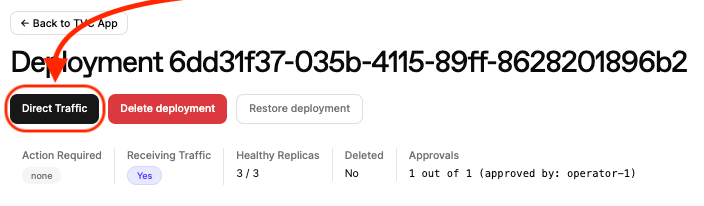
**Dashboard**: Click into your deployment on the [TVC dashboard](https://app.turnkey.com/dashboard/v2/tvc) and click **Direct Traffic**, then confirm with **Make live**.
 **CLI**:
```
tvc app set-live-deploy --deploy-id
```
On success:
```
Set-live-deploy accepted.
Deployment ID:
Activity ID:
Activity Status: Active
```
## Delete a deployment
Deleting a deployment tears down its deployed resources so that the enclave instances are stopped and cleaned up. The deployment record remains visible in the dashboard.
**Dashboard**: Click into your app, find the deployment, and click **Delete deployment**.
**CLI**:
```
tvc app set-live-deploy --deploy-id
```
On success:
```
Set-live-deploy accepted.
Deployment ID:
Activity ID:
Activity Status: Active
```
## Delete a deployment
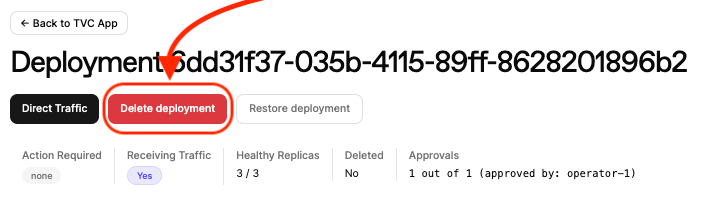
Deleting a deployment tears down its deployed resources so that the enclave instances are stopped and cleaned up. The deployment record remains visible in the dashboard.
**Dashboard**: Click into your app, find the deployment, and click **Delete deployment**.
 **CLI**:
```
tvc deploy delete --deploy-id
```
On success:
```
Deployment delete accepted; deployment is marked for deletion.
Deployment ID:
Activity ID:
Activity Status: Active
```
## Delete an app
Deleting an app tears down all of its child deployments. As with deployment deletion, the resources are cleaned up but the records remain visible.
**Dashboard**: Click into your app on the [TVC dashboard](https://app.turnkey.com/dashboard/v2/tvc) and click **Delete app**.
**CLI**:
```
tvc app delete --app-id
```
On success:
```
App delete accepted.
App and deployments marked for deletion.
App ID:
Activity ID:
Activity Status: Active
```
## Restore a deployment
A deployment marked for deletion can be restored before its resources are fully cleaned up.
**Dashboard**: Click into your app, find the deployment, and click **Restore deployment**.
**CLI**:
```
tvc deploy delete --deploy-id
```
On success:
```
Deployment delete accepted; deployment is marked for deletion.
Deployment ID:
Activity ID:
Activity Status: Active
```
## Delete an app
Deleting an app tears down all of its child deployments. As with deployment deletion, the resources are cleaned up but the records remain visible.
**Dashboard**: Click into your app on the [TVC dashboard](https://app.turnkey.com/dashboard/v2/tvc) and click **Delete app**.
**CLI**:
```
tvc app delete --app-id
```
On success:
```
App delete accepted.
App and deployments marked for deletion.
App ID:
Activity ID:
Activity Status: Active
```
## Restore a deployment
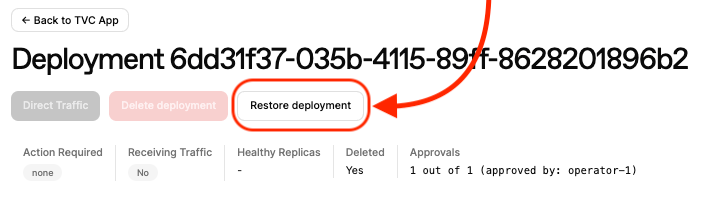
A deployment marked for deletion can be restored before its resources are fully cleaned up.
**Dashboard**: Click into your app, find the deployment, and click **Restore deployment**.
 **CLI**:
```
tvc deploy restore --deploy-id
```
On success:
```
Deployment restore accepted; deployment is no longer marked for deletion.
Deployment ID:
Activity ID:
Activity Status: Completed
```
**CLI**:
```
tvc deploy restore --deploy-id
```
On success:
```
Deployment restore accepted; deployment is no longer marked for deletion.
Deployment ID:
Activity ID:
Activity Status: Completed
```