> ## Documentation Index
> Fetch the complete documentation index at: https://docs.turnkey.com/llms.txt
> Use this file to discover all available pages before exploring further.
# Captcha
> Protect your auth flows from bots and abuse using Cloudflare Turnstile Captcha, enabled through the Turnkey Dashboard.
Turnkey integrates [Cloudflare Turnstile](https://www.cloudflare.com/products/turnstile/) to add Captcha protection to authentication flows. When enabled, Turnstile presents a lightweight, user-friendly challenge that blocks automated abuse such as bots, credential-stuffing attacks, and signup spam, all without disrupting the experience for real users.
Captcha protection is enforced at the two entry points most vulnerable to abuse:
* **Requesting an email or SMS OTP**: captcha is required when the code is sent, covering both signup and login flows.
* **Creating a new account (sub-organization)**: captcha is required during signup via passkey, OAuth / social login, or external wallet.
Once a user has passed the captcha challenge when the OTP was sent, the subsequent OTP verification and login steps are not challenged again. They are protected by a one-time verification token instead. Existing-account logins via passkey, OAuth / social, or wallet are not captcha-challenged.
## Enabling Captcha
Captcha protection is configured at the organization level in the Turnkey Dashboard. Once enabled, it is automatically enforced for the protected flows.
**Automatic enforcement applies only to `@turnkey/react-wallet-kit` users.** The Turnstile widget is rendered and captcha tokens are attached for you — no code changes required.
If you build your auth UI directly on `@turnkey/core` (plain JavaScript, TypeScript, Vue, Svelte, Angular, or a custom React UI), **you must integrate captcha yourself** — render the Turnstile widget, obtain a token, and pass it to the relevant SDK methods. See the [integration guides](#integration-guides) below for your setup.
Log in to the [Turnkey Dashboard](https://app.turnkey.com) and navigate to **Configuration** for Embedded Wallets.
Locate the **Captcha** setting in the Auth Proxy section.
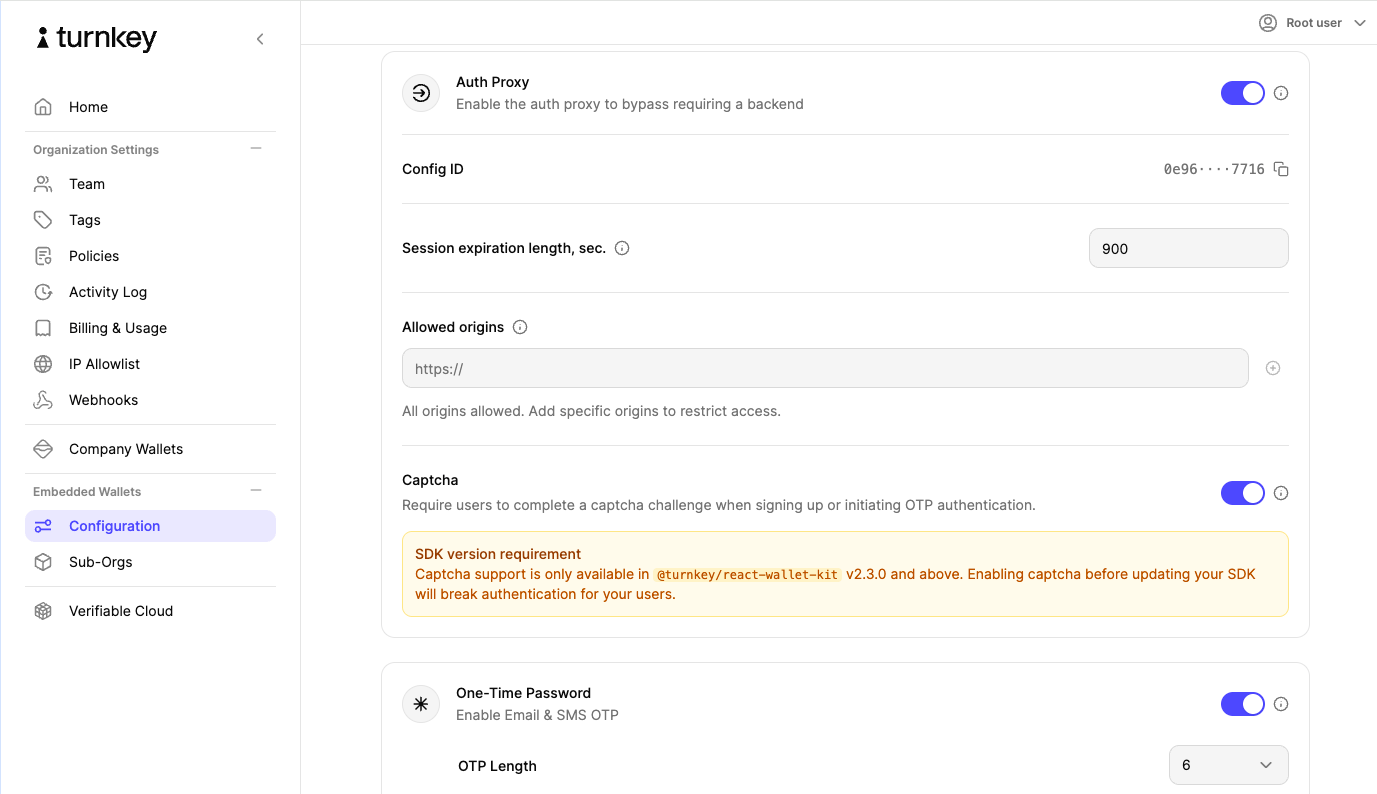 Toggle the setting **on** and save your changes. Captcha protection is now active for your organization.
Changes take effect immediately. Protected flows initiated through `@turnkey/react-wallet-kit` will display the Turnstile widget.
## Integration guides
How much work Captcha takes depends on which SDK renders your auth UI:
| Your setup | What you do | Guide |
| --------------------------------------------------------------------------------------------------------------------------------- | -------------------------------------------------- | ----------------------------------------------------------------------------------------------------------- |
| [`@turnkey/react-wallet-kit`](https://www.npmjs.com/package/@turnkey/react-wallet-kit) | Nothing. The widget and tokens are handled for you | [Captcha (React)](/solutions/embedded-wallets/integration-guide/react/captcha) |
| React Native or Expo | Render the widget in a WebView and pass tokens | [Captcha (React Native)](/solutions/embedded-wallets/integration-guide/react-native/authentication/captcha) |
| [`@turnkey/core`](https://www.npmjs.com/package/@turnkey/core) directly (plain JavaScript, Vue, Svelte, Angular, custom React UI) | Render the widget and pass tokens | [Captcha with `@turnkey/core`](/solutions/embedded-wallets/integration-guide/typescript/captcha) |
In every case the mechanics are the same: Turnstile runs its challenge when a user initiates a protected flow, issues a token on success, and Turnkey verifies that token before creating any auth activity. Requests that fail the challenge are rejected outright.
## Protected auth methods
| Auth flow | Captcha enforced |
| -------------------------------------------------- | ---------------- |
| Email OTP: sending the code (signup & login) | Yes |
| Phone (SMS) OTP: sending the code (signup & login) | Yes |
| New account signup via passkey | Yes |
| New account signup via OAuth / social login | Yes |
| New account signup via external wallet | Yes |
## Related
* [Captcha (React)](/solutions/embedded-wallets/integration-guide/react/captcha)
* [Captcha (React Native)](/solutions/embedded-wallets/integration-guide/react-native/authentication/captcha)
* [Captcha with `@turnkey/core`](/solutions/embedded-wallets/integration-guide/typescript/captcha)
* [Auth Proxy](/features/authentication/auth-proxy)
* [Authentication overview](/features/authentication/overview)
* [React Wallet Kit: Getting started](/solutions/embedded-wallets/integration-guide/react/getting-started)
Toggle the setting **on** and save your changes. Captcha protection is now active for your organization.
Changes take effect immediately. Protected flows initiated through `@turnkey/react-wallet-kit` will display the Turnstile widget.
## Integration guides
How much work Captcha takes depends on which SDK renders your auth UI:
| Your setup | What you do | Guide |
| --------------------------------------------------------------------------------------------------------------------------------- | -------------------------------------------------- | ----------------------------------------------------------------------------------------------------------- |
| [`@turnkey/react-wallet-kit`](https://www.npmjs.com/package/@turnkey/react-wallet-kit) | Nothing. The widget and tokens are handled for you | [Captcha (React)](/solutions/embedded-wallets/integration-guide/react/captcha) |
| React Native or Expo | Render the widget in a WebView and pass tokens | [Captcha (React Native)](/solutions/embedded-wallets/integration-guide/react-native/authentication/captcha) |
| [`@turnkey/core`](https://www.npmjs.com/package/@turnkey/core) directly (plain JavaScript, Vue, Svelte, Angular, custom React UI) | Render the widget and pass tokens | [Captcha with `@turnkey/core`](/solutions/embedded-wallets/integration-guide/typescript/captcha) |
In every case the mechanics are the same: Turnstile runs its challenge when a user initiates a protected flow, issues a token on success, and Turnkey verifies that token before creating any auth activity. Requests that fail the challenge are rejected outright.
## Protected auth methods
| Auth flow | Captcha enforced |
| -------------------------------------------------- | ---------------- |
| Email OTP: sending the code (signup & login) | Yes |
| Phone (SMS) OTP: sending the code (signup & login) | Yes |
| New account signup via passkey | Yes |
| New account signup via OAuth / social login | Yes |
| New account signup via external wallet | Yes |
## Related
* [Captcha (React)](/solutions/embedded-wallets/integration-guide/react/captcha)
* [Captcha (React Native)](/solutions/embedded-wallets/integration-guide/react-native/authentication/captcha)
* [Captcha with `@turnkey/core`](/solutions/embedded-wallets/integration-guide/typescript/captcha)
* [Auth Proxy](/features/authentication/auth-proxy)
* [Authentication overview](/features/authentication/overview)
* [React Wallet Kit: Getting started](/solutions/embedded-wallets/integration-guide/react/getting-started)